You swipe right from your Galaxy’s Home screen out of habit, and a feed of headlines is waiting. That page is scheduled to go quiet soon. Samsung has posted an in-app notice saying Samsung News will be discontinued on December 21, 2026, at 00:00 UTC. The app, its widget and the news page on the leftmost Home screen go with it, and Samsung will delete the personal data tied to the service.
Reports so far say the notice appeared in India and South Korea. As of October 2026, I found no US-specific notice, but nothing says the US is exempt. This guide covers what ends, when it ends in US time, what happens to your data, and how to move to a replacement.
Is Samsung News really shutting down in the US?
Samsung News is confirmed to be shutting down, but the notice has only been reported in India and South Korea so far. Several outlets, including SamMobile, Android Authority and Men’s Journal, report the same in-app notice and the same date. I found no standalone Samsung support page announcing the closure, and no US-specific announcement as of October 31, 2026.
| Question | What is confirmed (as of October 2026) | What is not |
|---|---|---|
| Shutdown date | December 21, 2026, 00:00 UTC, per the in-app notice | Whether every region gets the same date |
| Where the notice appeared | India and South Korea | A US or global notice |
| What ends | The app, the widget and the leftmost Home screen media page | Anything that replaces them |
| Your data | Samsung says personal information, profiles and personalization data will be deleted | An export or transfer tool |
| Reason | Samsung hasn’t given one | The cause is unknown; any explanation is speculation |
Three claims are circulating that the notice does not support:
- “It shuts down December 31.” At least one report’s headline says this, but the notice text it quotes says December 21. Every other report I found also says December 21.
- “Samsung will replace it with something.” Samsung has announced no replacement.
- “Your Samsung account is affected.” The notice as reported covers data collected through Samsung News, and nothing in it mentions your Samsung account.
What actually stops working on December 21?
The Samsung News app, its Home screen widget and the dedicated news page left of your Home screen are all covered. Samsung says the widget will stop receiving content updates and recommends removing it from your Home screen.
What fills the leftmost page afterward is less clear. Android Authority expects Google Discover to become the only feed there. That is a reasonable inference, since Discover already shares that page with Samsung News, but Samsung has not confirmed it.
What most people miss: Samsung’s own US support page says you can’t delete either Samsung News or Google Discover. You can only disable them. So the setting that controls your swipe-right page is the same one you’ll use to switch feeds.
What time does it end in the US?
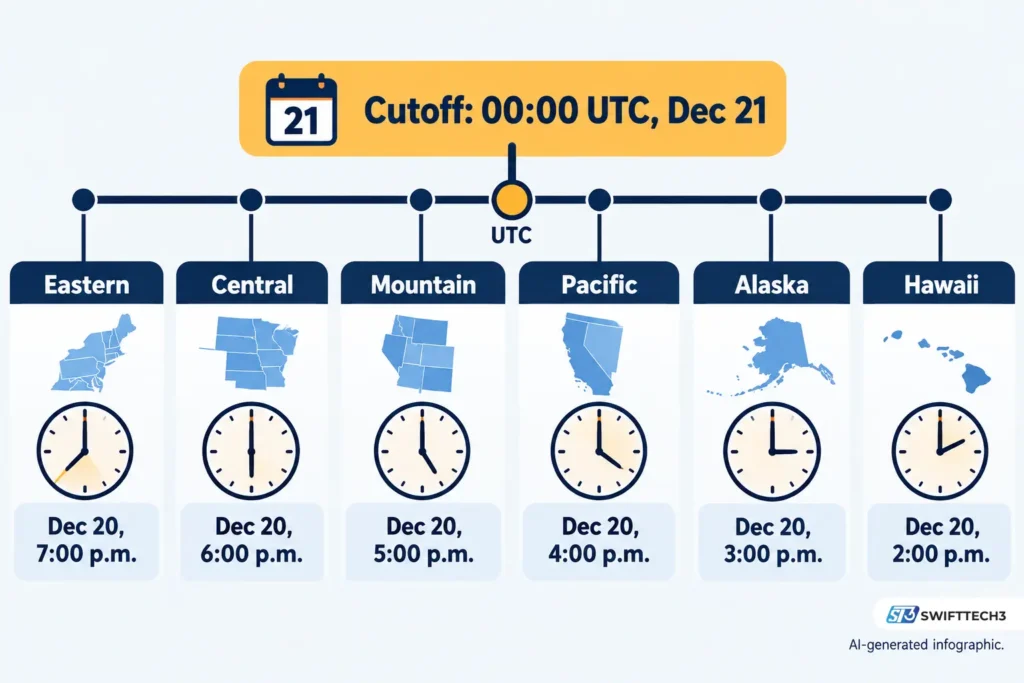
For US users, the cutoff lands on the evening of Saturday, December 20, not on December 21. The notice gives 00:00 UTC, and in December the US observes standard time.
| US time zone | Local time of the cutoff |
|---|---|
| Eastern | Dec 20, 7:00 p.m. |
| Central | Dec 20, 6:00 p.m. |
| Mountain | Dec 20, 5:00 p.m. |
| Pacific | Dec 20, 4:00 p.m. |
| Alaska | Dec 20, 3:00 p.m. |
| Hawaii | Dec 20, 2:00 p.m. |
From October 31, 2026, that’s 51 days to December 21 itself. Treat the evening of December 20 as your real deadline for saving anything.
What happens to your Samsung News data?
Samsung says all personal information collected through Samsung News, including profiles and personalization settings, will be deleted without undue delay once the service ends. There is a legal exception. Where laws or regulations require Samsung to keep certain records, it will keep them for the required period and then delete them.
Two gaps matter here:
- None of the coverage I found describes a way to export or transfer your followed publishers, topics, teams or saved items. Samsung hasn’t announced one.
- The deletion is described as covering Samsung News only, so the notice gives no reason to expect other Samsung services to be affected.
The practical result is that anything you want from your Samsung News setup, you have to record yourself.
Why this feels familiar: a short history of Samsung’s home screen feeds
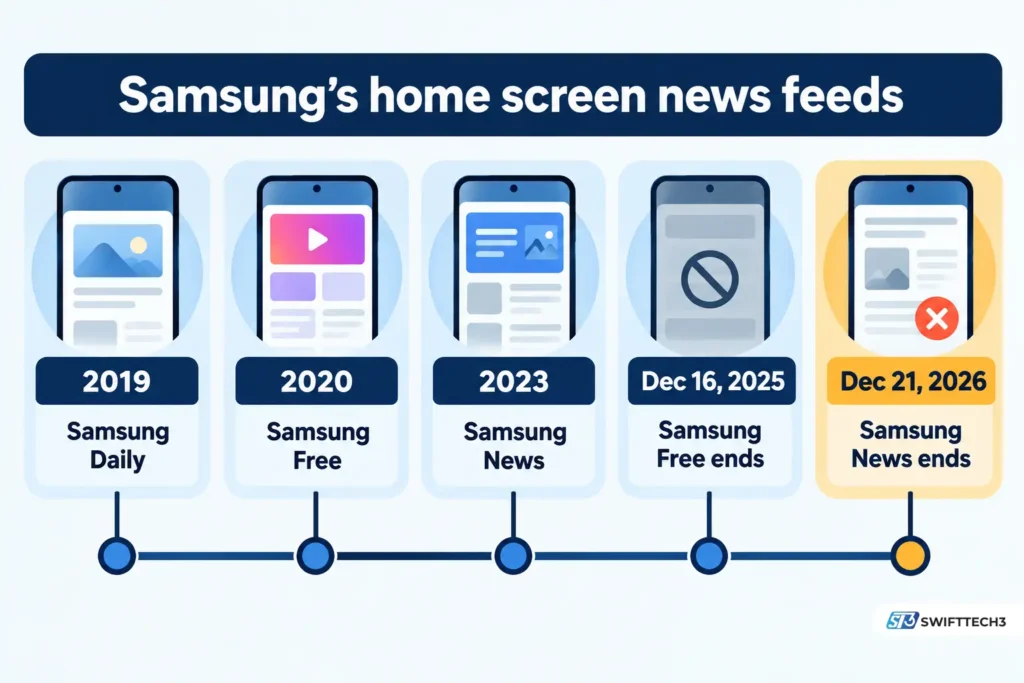
Samsung has replaced its leftmost-page feed repeatedly, and its last migration push is barely a year old.
| Date | Event |
|---|---|
| October 2019 | Samsung Daily launches |
| 2020 | Samsung Free replaces Samsung Daily |
| 2023 | Samsung News launches as the successor |
| December 16, 2025 | Samsung Free ends; Samsung’s notice tells users to move to Samsung News |
| May 5, 2026 | Samsung’s US newsroom announces short-form video and more premium publishers for Samsung News |
| October 26, 2026 | Date of the in-app discontinuation notice, as quoted in reports |
| December 21, 2026, 00:00 UTC | Scheduled Samsung News shutdown |
Samsung told Samsung Free users to move to Samsung News, and that destination is now closing about 370 days later. The May update added video and publisher content only months before the closure notice.
Don’t mix these up: names that sound alike
| Name | What it is | Affected? |
|---|---|---|
| Samsung News | The news app, widget and Home screen page | Yes, scheduled to end Dec 21, 2026 |
| Samsung Free | The earlier content app | Already ended Dec 16, 2025 |
| Samsung Newsroom | Samsung’s own press site | I found no sign it is part of this |
| Google Discover | Google’s feed, shared with Samsung News on the leftmost page | No |
| Samsung Daily Plus | A separate smart-TV service | Reported as a separate shutdown |
| Samsung TV Plus, Gaming Hub | Apps Samsung pointed Samsung Free users to for the removed Watch and Play tabs | No notice found |
How do you switch your swipe-right page to Google Discover?
You switch in the Home screen settings, and it takes about ten seconds. These steps follow Samsung’s US support guidance.
- Touch and hold a blank area of your Home screen.
- Swipe right to reach the media page settings. The page splits between Google Discover and Samsung News.
- Tap Google Discover.
- Swipe right from the Home screen. Discover now appears.
If you want no feed at all, use the same screen and tap the switch at the top. That turns off both Discover and Samsung News.
Three caveats:
- Samsung notes that Discover’s availability can vary by country, carrier and model. It also says accounts under 13 are restricted from using it on the Galaxy S24 series.
- Samsung describes Discover as a feed personalized from your search and browsing history. You’re trading a feed built on Samsung’s data for one built on Google activity. Samsung says you can adjust Discover’s interests in the Google app or Chrome.
- Switching doesn’t remove the Samsung News widget. Take that off your Home screen the way you remove any widget.
Don’t wait for the shutdown. Samsung hasn’t said what the page will show afterward, and choosing now means you decide.
What should you save before December 21?
Save anything you can’t easily recreate, because Samsung hasn’t announced an export. Work through this list while the app still opens:
- Followed sources and topics. Open the app, check the Follow tab and screenshot your publishers, topics, teams and stock tickers.
- Saved articles. Screenshot them or open the original publisher’s page and bookmark it there.
- Notice text. If you see the discontinuation banner, screenshot it for your records.
- Widget layout. If the widget sits in a spot you like, note where, so you can drop a replacement there.
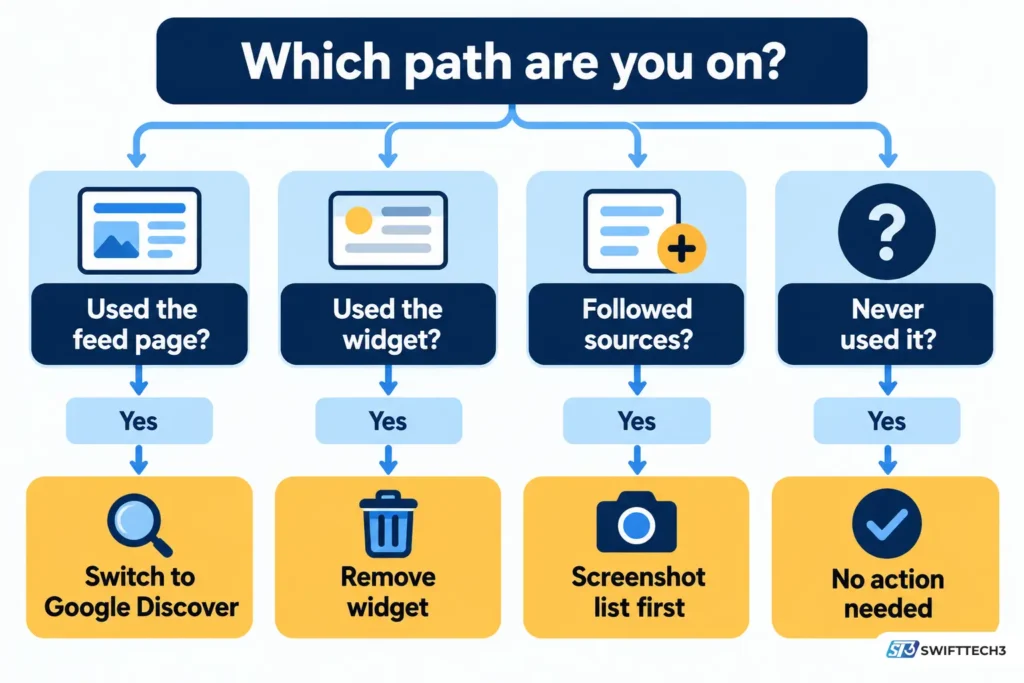
Which path are you on?
This table is illustrative. It sorts readers by how they used the feed.
| How you used Samsung News | What to do |
|---|---|
| Never opened it | Nothing urgent. Check whether your swipe-right page shows it, and switch if you want a feed |
| Used the swipe-right page | Switch to Google Discover now, or turn the page off |
| Used the widget | Remove it and choose a replacement widget or app |
| Followed specific outlets or teams | Screenshot your Follow list first, then rebuild it in your next app |
| Read it for premium publishers | Go to those publishers’ own apps or sites. Samsung’s May announcement named outlets like ABC News, USA TODAY and The Washington Post |
What are the alternatives to Samsung News?
Google Discover is the easiest swap because it’s already on your Galaxy. Several outlets also name other options. I haven’t tested these, so check each app’s store listing for price and privacy terms.
| Option | Good for | Catch |
|---|---|---|
| Google Discover | Keeping the swipe-right habit with no new app | Personalized from your Google activity; can’t be deleted, only disabled |
| Google News app | A dedicated news app instead of a feed page | A separate app, not a swipe-right page |
| Magazine-style browsing | You rebuild your interests from scratch | |
| SmartNews | A different recommendation style | Same rebuild, plus another account decision |
| RSS reader | Full control over sources, no algorithm | You add each source yourself |
| Publisher apps and newsletters | Direct access to the outlets you trust | One app per outlet |
For more phone and app guides, browse our gadgets coverage and tech explainers.
Troubleshooting: what you might see
| Symptom | Likely cause | Fix |
|---|---|---|
| Swipe right shows nothing | The media page switch is off | Touch and hold the Home screen, swipe right, tap the switch at the top |
| No Discover option appears | Discover availability varies by country, carrier and model | Check the Home screen settings for what your device offers; use an app alternative |
| Widget shows stale headlines | Samsung says the widget stops updating at shutdown | Remove the widget |
| Samsung News notice appears only on some phones | Samsung rolls notices out unevenly; the first sightings were in India and South Korea | Open the app and look for the banner |
| Followed topics missing later | Samsung says profile and personalization data will be deleted | Rebuild them from your screenshots in your new app |
Be careful with “shutdown” messages
Samsung’s earlier shutdown of its Messages app in July 2026 was followed by fake texts imitating Samsung’s notices, according to IBTimes Australia. A news-app shutdown could draw the same copycats. Look for the notice inside the Samsung News app itself. Don’t tap links in texts or emails that claim to be Samsung “shutdown” or “data export” notices, and never enter account details through one.
Frequently asked questions
Will Samsung News stop working in the US?
Samsung has only been reported to post the notice in India and South Korea. I found no US announcement as of October 2026. Because the leftmost-page service is shared across regions, a wider rollout is plausible, but that’s not confirmed.
Can I keep using Samsung News after December 21?
Samsung says the service will be discontinued, the widget will stop updating and the data will be deleted. Plan on it being gone after the cutoff.
Is Samsung replacing Samsung News?
No replacement has been announced. Google Discover already shares the leftmost page and is the likeliest default, but that’s an inference from reports, not a Samsung statement.
Did Samsung say why it’s shutting Samsung News down?
No. Reports say Samsung gave no reason. Any explanation about low usage or cost-cutting is outside speculation.
Is this the same as Samsung Free shutting down?
No. Samsung Free ended on December 16, 2025, and Samsung told its users to move to Samsung News. Samsung News is a separate, later service.
Does this affect my Galaxy watch or TV?
The notices I found refer to phones and tablets. I found no shutdown notice for Samsung TV Plus or Gaming Hub.
Conclusion
Samsung News is scheduled to end at 00:00 UTC on December 21, 2026, which is the evening of December 20 across the US. The app, widget and leftmost page are affected, and Samsung says it will delete your Samsung News data. US rollout hasn’t been confirmed in the notices reported so far, but it makes sense to act as if it applies. Screenshot your followed sources, remove the widget when you’re ready, and switch your swipe-right page to Google Discover or another feed.
Next step: open the Samsung News app today, screenshot your Follow list and check for the notice banner.
Related: Android 2026: Major OS Enhancements That Improve User Experience
For ongoing coverage, see our tech news.
Disclaimer: This article is for informational purposes only and is not affiliated with, sponsored by or endorsed by Samsung, Google or any brand mentioned. Prices, features, availability and policies may change, and Samsung’s shutdown details may differ by region. Information last verified on October 31, 2026. AI-assisted content can contain errors, so confirm details in the in-app notice and Samsung’s official support pages, and avoid tapping links in unsolicited “shutdown” messages.