
WizTree is a disk space analyzer from Antibody Software Limited that shows which files and folders use the most space. As of November 2026, the Windows version is 4.33, it is free for personal use, and a macOS version called WizTreeMac 1.00 exists. Business use requires a paid supporter code, starting at $25 USD.
Your C: drive reports 3 GB free, File Explorer shows nothing unusual, and a Windows update wants 8 GB. A disk space analyzer replaces that guesswork with a sorted list and a map of every file. This guide covers who makes WizTree, who has to pay, how safe it is, how to use it, and how it compares with WinDirStat today.
Who makes WizTree, and which download is the real one?
WizTree is made by Antibody Software Limited, and the official site is diskanalyzer.com. The vendor’s purchase page lists a Tauranga, New Zealand address, so reviews that call the company UK-based do not match the vendor’s own page.
Several pages use the WizTree name without being the vendor’s download page, so check before you click.
| Name or page | What it is | Status as of November 2026 |
|---|---|---|
| diskanalyzer.com | The vendor’s site, which calls itself the official WizTree site | Official |
| wiztreefree.com | The old domain; the vendor’s change log says the site moved to diskanalyzer.com in June 2021 | Former official domain |
| WizTreeMac | The official macOS port, first released 16 September 2026 as version 1.00 | Official, separate version numbering |
| WizFile | A different Antibody Software product (instant file search) | Not WizTree |
| SourceForge “WizTree” project | Lists a 4.27 portable ZIP and credits a user named “designlab” | Could not be confirmed as vendor-run; 4.27 is six releases behind 4.33 |
| Download aggregators | Third-party copies | Versions vary; verify against the vendor’s published checksum |
The vendor also publishes install commands on its download page: winget install -e --id AntibodySoftware.WizTree for Windows, and brew install --cask antibodysw/tap/wiztree for macOS.
Is WizTree free?
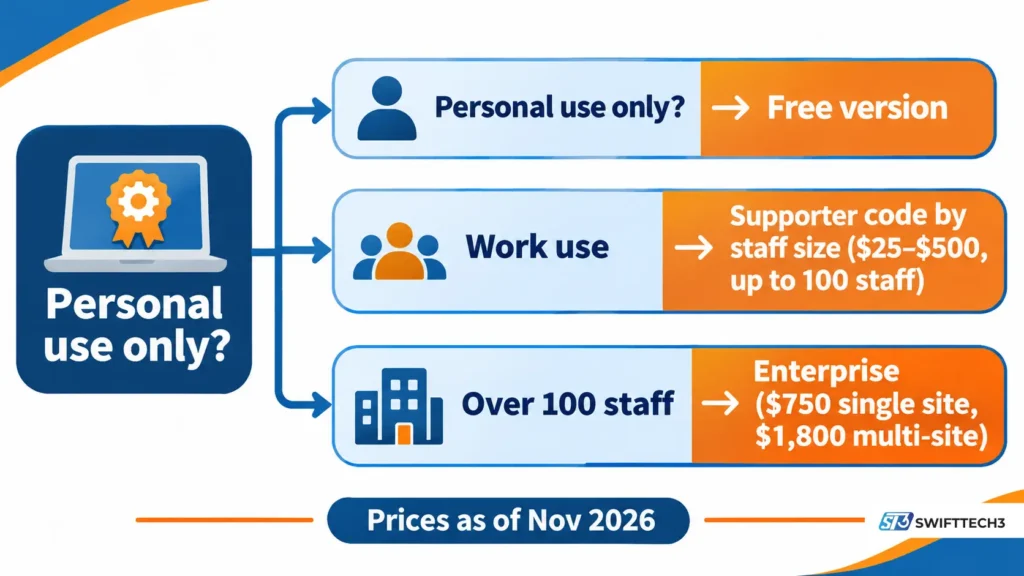
WizTree is free for personal use only. According to the vendor’s download page, as of November 2026, the free version excludes commercial use, shows a donation button, adds a donation message to exports, and includes no support.
Business use needs a supporter code, priced by the total number of staff in your organization, not by the number of people using WizTree.
| License | Price (USD) | Notes |
|---|---|---|
| Individual | $25 | Perpetual code |
| Micro business (up to 5 staff) | $100 | |
| Small business (up to 20 staff) | $200 | |
| Medium business (up to 50 staff) | $350 | |
| Large business (up to 100 staff) | $500 | |
| Enterprise, single site | $750 | Unlimited use; priority support |
| Enterprise, multi-site | $1,800 | Unlimited use; priority support |
Terms that matter more than the headline price:
- One code covers one site. It works on all staff devices at that site, PCs or Macs. Each extra location needs its own license.
- Codes are perpetual, but upgrades are not. A code works on every version released within one year of purchase. After that you can stay on the last covered version or buy a new code.
- Renewals cost less. The purchase page offers 50% off the regular price for a renewal license.
- Sales tax is automatic for buyers in the EU and New Zealand, and discounts are listed for non-profits.
Cost math (illustrative). A 15-person company falls in the Small tier at $200. Staying current for three years means buying once and renewing twice at 50%: $200 + $100 + $100 = $400. A 4-person firm pays $100 + $50 + $50 = $200 over the same period. These sums assume you renew each year, which is optional.
If you work for a managed service provider, the vendor says technicians may install WizTree on client devices for their own organization’s use, provided the provider holds a suitable license for its own site. Clients who want to use it for their own staff need their own license.
Is WizTree safe?
WizTree is a long-running, vendor-published utility, and its core job is reading file-system data. Several parts of the safety question have published answers and some do not.
What the vendor documents
- It reads the NTFS Master File Table directly, which requires administrator rights. You can turn off “Always Run as Administrator” in Options, but fast NTFS scanning then stops working.
- The license check needs a connection to the vendor’s server at antibody-software.com.
- The change log for 4.29 (March 2026) lists a fix for a possible security issue with illegal file names, such as names with a trailing space, that could cause the wrong file to open when double-clicked.
- The vendor lists large organizations among its users, including Meta, Valve and KPMG. That is a vendor claim and was not independently verified.
What is not published
- The vendor’s privacy policy states that it covers the website only. It says nothing about what the desktop program does with data. Some third-party guides assert there is no telemetry, but no primary source confirms it.
- Antivirus detection results for the current installer were not tested for this article.
How to check a download yourself
- Download only from diskanalyzer.com, using the same secure software download habits you would use for any utility.
- Compare the SHA256 hash on the download page with your file. As of November 2026, the page shows the installer 4.33 hash as beginning 3c56dfc0 and ending eead2ff1. The portable ZIP begins 38b30aab and ends b6bd2c6d.
- In PowerShell, run
Get-FileHash .\wiztree_4_33_setup.exe -Algorithm SHA256and compare the result.
The bigger risk is deletion, not the program. WizTree can delete what it lists, and the official About page warns against removing files Windows needs. The change log says deletion uses standard Windows dialogs but does not say whether files go to the Recycle Bin. Do not assume an undo exists.
How do you use WizTree to find the biggest files?
Scan the drive, sort by size, then verify every file before deleting it. The steps below use only features described in the vendor’s documentation.
- Install WizTree 4.33 (4.9 MB installer) or unzip the portable build (7.4 MB), then accept the administrator prompt.
- Pick a drive in the drop-down and press Scan. Press F5 to rescan after changes; the tree keeps its expanded state.
- Open the Tree View to drill into folders and the File View to see individual files by size. F8 shows file types, and F9 toggles the treemap.
- Type a filter into File View search to narrow the list (examples below).
- To check duplicates, choose a detection method in the Duplicate Files drop-down and tick Duplicates only.
- Open anything doubtful in Explorer or its Properties before you delete it.
| Goal | Filter (from the vendor’s guide) |
|---|---|
| Files larger than 1 GB changed in the last 30 days | >=1gb >=today-30 |
| Folders larger than 1 GB | =folder >1g |
| MP3 or WAV files over 5 MB | *.mp3|*.wav >5m |
| Files changed in the last hour | >NOW-1h |
What most people miss about duplicates. According to the vendor’s 4.19 change log, WizTree does not compare file contents. It matches by name and size, or by name, size and date. It also treats Windows-style variants such as “NAME (1).EXT” or “NAME – COPY.EXT” as equivalent. Two files can match without being identical, so open both before removing either.
For routine cleanup of temporary files, Windows’ own Storage settings and Storage Sense are the better first stop, as Dell’s support documentation also describes. Use WizTree to find the large items those tools do not surface.
Why is WizTree fast, and when does it slow down?
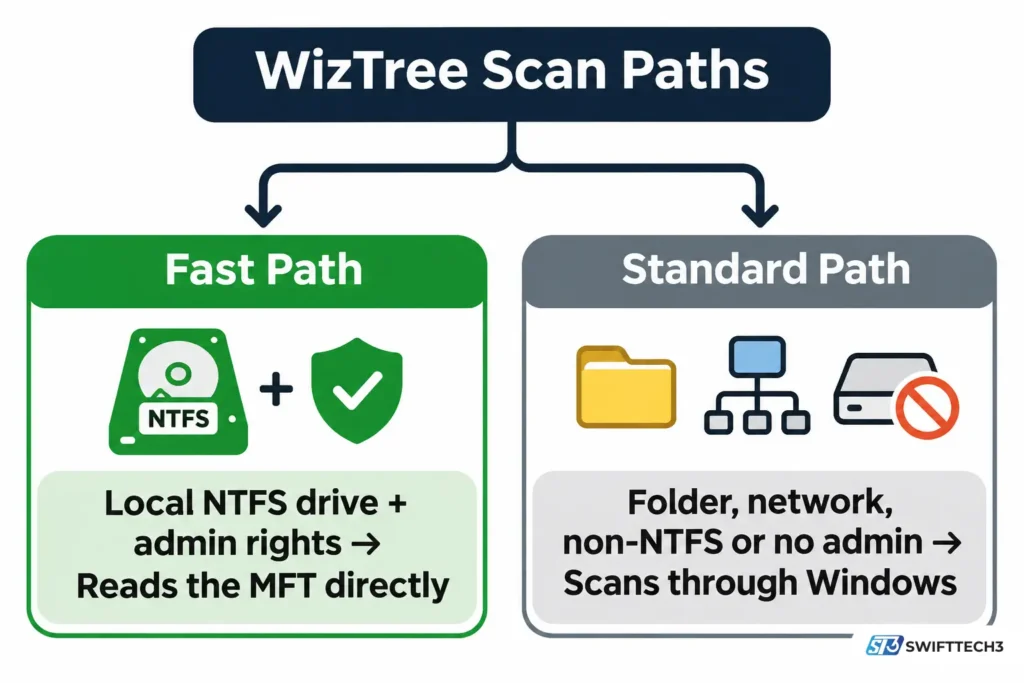
WizTree is fast because, on NTFS drives, it reads the Master File Table (MFT), the hidden index NTFS keeps of every file and folder, instead of opening each folder through Windows. The vendor says this bypasses the operating system.
The speed has conditions:
- It needs administrator rights. Without them, WizTree falls back to Windows-API scanning.
- It applies to NTFS volumes. Non-NTFS, network and USB scans use the slower method.
- Folder scans differ. Selecting a single folder uses the Windows API by default. Holding Ctrl when a scan starts, or enabling the MFT tweak in Options, forces an MFT scan.
- The fallback has improved. The vendor says 4.21 made non-admin SSD scans more than 4x faster, and 4.28 added up to 2x more in some cases.
Huge drives can stall at the display stage rather than the scan stage. For millions of files, the vendor suggests turning the treemap off with F9.
Why doesn’t WizTree’s total match what Windows reports?
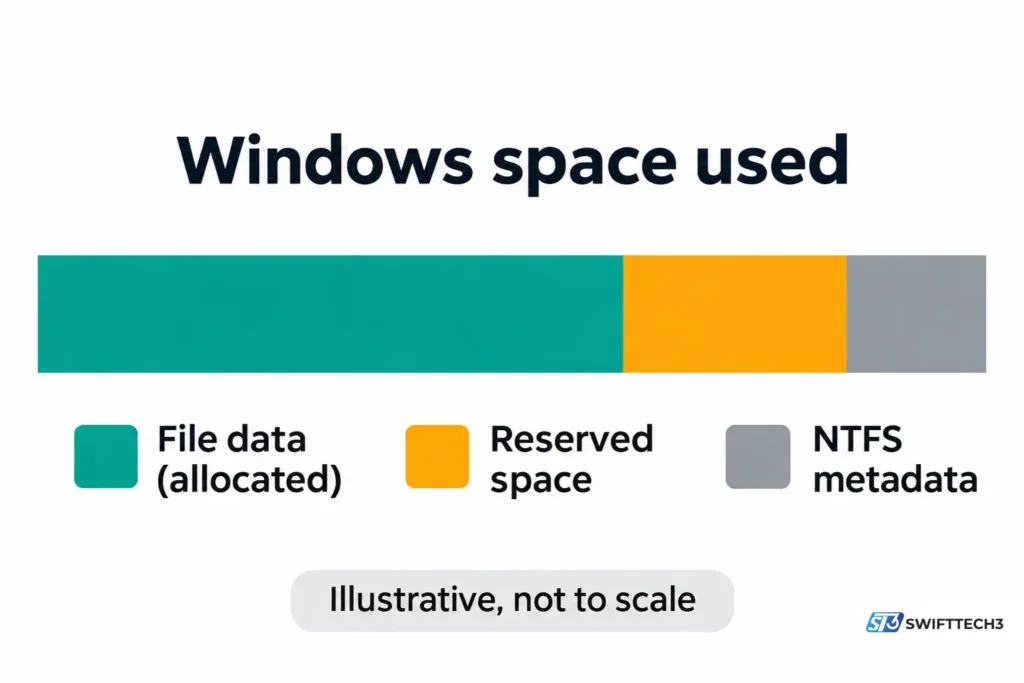
Expect WizTree’s total allocated space to be slightly lower than Windows’ “space used.” The vendor’s home page says totals will match Windows, but its FAQ explains that NTFS stores some data, such as directory indexes and security information, that does not appear as files.
Two terms explain most confusion:
- Size is the file’s actual size.
- Allocated is the disk space reserved for it, always a multiple of the drive’s cluster size. Compressed files usually have a lower allocated size.
Since 4.14, new installs sort by Allocated by default, and since 4.21 WizTree shows reserved space for NTFS volumes. The vendor says reserved space accounts for most of the gap on drives with Windows installed.
Is WizTree faster than WinDirStat in 2026?
Not by the margin on the vendor’s home page. WizTree still markets itself as built for speed, but WinDirStat has added the same core technique since the vendor’s test.
The vendor’s “46x faster” claim comes from a test of WizTree 3.40 against WinDirStat 1.1.2.80. In it, a 25 GB hard drive on Windows XP scanned in 4.34 seconds versus 3 minutes 20 seconds, and a 460 GB SSD on Windows 10 took 5.23 seconds versus 1 minute 55 seconds. Those figures work out to 46.1x and 22.0x. We did not rerun any benchmark.
WinDirStat’s 2.x releases, which began in October 2024 after a long gap, now include accelerated scanning. WinDirStat’s own documentation says this reads the NTFS Master File Table directly for drive scans, needs elevation, and applies to local NTFS drives, with folder, network and non-NTFS scans using the normal scanner. Version 2.5 (January 2026) introduced the option, per its change log.
| Feature | WizTree 4.33 | WinDirStat 2.x |
|---|---|---|
| Direct MFT scanning | Yes, with admin rights, local NTFS | Yes since 2.5, elevated, local NTFS |
| Duplicate detection | Name and size, optionally date; no content comparison | Hash-based per its change log |
| Platforms | Windows; macOS as WizTreeMac | Windows |
| License | Free for personal use; paid for business | Open source |
| CSV export | Yes, plus MFT dump and CSV import | Yes |
If you need a free tool for office machines, WinDirStat’s license avoids the commercial fee. If you already use WizTree at home, nothing here forces a switch.
Does WizTree work on Mac, Windows Arm, Linux and phones?
WizTree now runs on Windows and macOS, and the vendor lists no Linux version.
- macOS: WizTreeMac 1.00 needs macOS 12 (Monterey) or later and runs on Apple silicon and Intel. APFS and HFS+ have no MFT equivalent, so it uses macOS’s bulk directory enumeration instead. It needs Full Disk Access for protected folders, and the same supporter code works on both platforms.
- Windows Arm: Version 4.32 (August 2026) officially confirmed support through Windows’ Prism emulation.
- Older Windows: The download page lists Windows 11, 10, 8, 7, Vista, XP and Server 2003 and later.
- Phones and cameras: On Windows, WizTree can scan MTP/PTP devices over USB. WizTreeMac does not support this yet.
- Linux or mobile apps: The official site lists neither. Guides that mention “WizTree Mobile” or “WizTree Linux” are describing workarounds, not products.
What changed in WizTree recently?
| Date | Version | Change |
|---|---|---|
| 16 September 2026 | 4.33 | WizTreeMac 1.00 launched; CSV files from the Mac version can be imported and exported |
| 5 August 2026 | 4.32 | Windows Arm support confirmed; imported complete CSVs can be filtered with recalculation |
| 23 March 2026 | 4.31 | ReactOS support; taskbar exception fix |
| 4 March 2026 | 4.29 | File renaming (F2); fix for the illegal-file-name issue |
| 24 November 2025 | 4.28 | Faster non-admin scans; fixed OneDrive folder scanning in non-admin mode |
What goes wrong, and how do you fix it?
| Symptom | Likely cause | Fix |
|---|---|---|
| Scan is slow on an external drive | Drive is not NTFS, or WizTree is not running as admin | Use an NTFS drive and run as administrator |
| Supporter code will not validate | Firewall or antivirus blocks the license server | Allow WizTree to reach antibody-software.com |
| Code entry appeared to fail silently | Entered without admin rights on the installed version (fixed in 4.32) | Update to 4.33 and restart as administrator |
| Cannot drag a CSV from Explorer into WizTree | One program runs elevated and the other does not | Start Explorer elevated, or run WizTree without admin |
| Mapped network drive missing | Windows hides drives mapped by non-elevated processes from elevated ones | WizTree shows the UNC path; the installer also adds a registry fix that needs a restart |
| Treemap hangs on a huge folder | Millions of files to draw | Press F9 to turn the treemap off |
Who should use WizTree, and who should skip it?
Use it if you want to find large files on your own Windows or Mac machine, or you need exportable file lists for audits. Skip it, or buy a license, if you are using it at work without a supporter code.
A quick three-question check (illustrative, built from the facts above):
| Question | If yes | If no |
|---|---|---|
| Is this use personal? | Free version is fine | Buy the tier for your staff size |
| Is the drive local NTFS, and can you run as admin? | Expect full-speed scans | Expect standard-speed scans |
| Do you need content-verified duplicates? | Use a tool that compares contents, or check files yourself | Name, size and date matching may be enough |
Myth or fact?
| Claim | Verdict |
|---|---|
| “WizTree is Windows-only.” | Outdated. WizTreeMac launched 16 September 2026. |
| “WizTree is 46x faster than WinDirStat.” | Vendor claim from a test of older versions; WinDirStat 2.5 added MFT scanning. |
| “Duplicates are verified identical.” | No. Matching is by name and size, optionally date. |
| “WizTree is free for everyone.” | No. It is free for personal use only. |
| “SourceForge is the official download.” | Not confirmed. Use the vendor’s site. |
If a guide makes confident claims like these without naming a version or date, treat it with the same caution you would use for fake SEO-driven guides.
WizTree FAQs
Is WizTree free for commercial use?
No. The free version allows personal use only. Commercial use requires a supporter code priced by staff size, from $25 to $500 for up to 100 staff, or $750 and $1,800 for enterprise licenses, as of November 2026.
Is WizTree safe to download?
The vendor’s official site is diskanalyzer.com, and its download page publishes SHA256 hashes you can check. The desktop program’s data-collection practices are not documented, because the privacy policy covers only the website.
Why does WizTree ask for administrator rights?
Reading the NTFS Master File Table directly needs elevated access. You can turn off “Always Run as Administrator,” but scans then use the slower Windows-API method.
Does WizTree delete files automatically?
No. The vendor describes deletion as an optional action you take. Check each item first, because the change log does not say whether deleted files go to the Recycle Bin.
Is there a WizTree for Mac?
Yes. WizTreeMac 1.00 launched on 16 September 2026 for macOS 12 or later. It does not yet scan MTP phones, and a Windows supporter code works on both platforms.
Can WizTree scan USB drives and phones?
Yes on Windows. It scans USB drives, network drives and folders, and MTP/PTP devices such as phones and cameras over USB. Only NTFS volumes get the MFT speed-up.
How do I update WizTree?
Download the latest installer and run it over your existing copy. You do not need to uninstall first, and your license information is kept. For the portable version, unzip the new ZIP over the old files.
What is the difference between WizTree and WinDirStat?
Both show disk usage as a treemap, and both can read the NTFS MFT when elevated. WizTree is free only for personal use, while WinDirStat is open source. WizTree also runs on macOS, and its duplicate matching uses names and sizes rather than file hashes.
Conclusion
WizTree is a practical way to see what fills your drive, as long as you meet its personal-use license or buy the right tier. Its speed depends on NTFS, administrator rights and a local drive, and the “46x” figure describes an older test.
Key takeaways
- Download only from diskanalyzer.com and check the published hash.
- Personal use is free; business use starts at $25 and scales with staff size.
- Duplicates are matched by name and size, so verify before deleting.
- WinDirStat 2.5 now has direct MFT scanning too.
Next step: scan your main drive, sort File View by size, and open the three largest files in Explorer before deciding what to remove.
Related: AI productivity tools updates for 2026
Disclaimer
This article is for informational purposes only. It is not affiliated with, sponsored by or endorsed by Antibody Software Limited, WinDirStat, Microsoft, Apple or any other brand mentioned. Prices, features and license terms may change, and the information was last verified on 10 November 2026. Deleting files can cause data loss or stop Windows from working, so back up important data and check each file before removing it.
“How this was made” note
AI assisted with research and drafting. The content was fact-checked against the vendor’s official pages (home, about, download, purchase, FAQ, change log, privacy policy and comparison pages) and WinDirStat’s own documentation, all read on 10 November 2026. The cost and benchmark arithmetic was run with code. The software itself was not installed or tested, and no screenshots were captured.