
Tech On Dicas (techondicas.com) is a Portuguese-language blog with practical tips on WhatsApp, phones, internet and apps; as of November 2026 its homepage lists posts through November 9. Similar names, such as Tech On Droid and tech-on-dicas.com, are separate domains, so check the address before trusting a page.
You search “Tech On Dicas,” open a result, and find Portuguese text, a different domain, or an English page that never mentions where its tips came from. That is a common experience with this name. This guide explains what the site is, how it differs from similarly named pages, and which of its recent tips match official documentation.
What is Tech On Dicas, and is it the same as the other “Tech On” sites?
Tech On Dicas is a WordPress blog at techondicas.com, and “dicas” is Portuguese for “tips.” As of November 11, 2026, its homepage tagline describes a site of tips and general knowledge. Its menu includes WhatsApp tips, phones, internet, entertainment, cars and extra income. Posts carry the byline “ceo dicas.”
Other names are easy to mix up with it:
| Name or address | What it is, based on pages read on Nov 11, 2026 | Same as techondicas.com? |
|---|---|---|
| techondicas.com | Portuguese (Brazil) tips blog; newest homepage post dated Nov 9, 2026 | This is the site itself |
| Tech On Droid (techondroid.com) | Portuguese Android-tips blog; newest posts on its front page dated March 2025 | Separate domain; shared ownership not stated on pages read |
| Tech On Apps (techonapps.com) | Cited by Google’s summary as an app-tips site | Page could not be opened in our check |
| tech-on-dicas.com | Linked by two English guides (Our Code World, PC Tech Magazine) | Separate domain; page could not be opened in our check |
| “Tech On Dicas Smart” on Instagram | Social account cited in Google’s summary | Not verified |
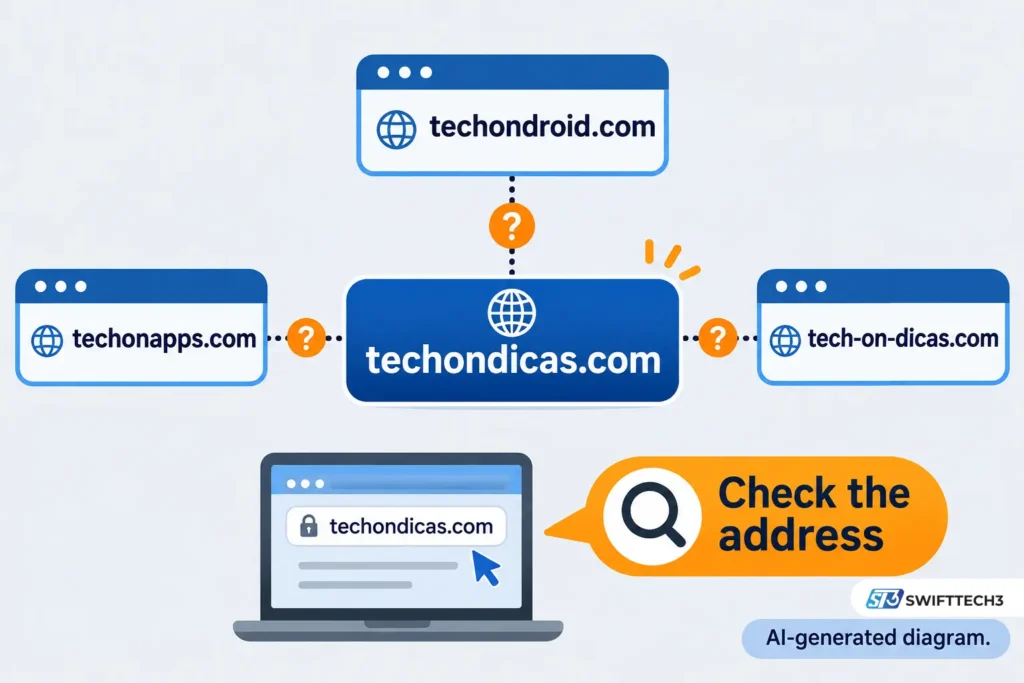
What most people miss: the Our Code World guide says it is not an official publication of techondicas.com, yet it links to tech-on-dicas.com. PC Tech Magazine’s guide says a search for an APK does not prove an official app exists. The techondicas.com homepage I read showed no app download.
Is Tech On Dicas available in English?
No. The site declares its locale as Brazilian Portuguese, and every page I read was in Portuguese. English-language pages about “Tech On Dicas” are third-party guides, not translations.
If you follow a Portuguese tutorial on an English phone, menu names will differ. PC Tech Magazine gives one example: “Privacy” appears as “Privacidade” in Portuguese. Match the instruction to your phone’s language, model and software version before changing anything.
What has Tech On Dicas published recently, and does it hold up?
Several recent posts point to official announcements, and the ones I checked match them. The table shows what I could and could not confirm on November 11, 2026.
| Post date | Topic on the site | Our check |
|---|---|---|
| Oct 8, 2026 | WhatsApp calls from the browser | Confirmed: WhatsApp announced web calling on July 28, 2026 |
| Oct 11, 2026 | Silence unknown callers on WhatsApp | Confirmed: WhatsApp announced it on June 20, 2023 |
| Oct 12, 2026 | iPhone Back Tap | Confirmed in Apple’s support documentation |
| Oct 15, 2026 | Facebook “Your algorithm” | Confirmed: Meta announced it on Oct 13, 2026 |
| Oct 20, 2026 | WhatsApp message scheduling in beta | Site cites WABetaInfo; not checked |
| Nov 1, 2026 | WhatsApp mentions filter in groups | Not checked |
This is a spot check of four posts, not an audit of the whole site.
How do you silence unknown callers on WhatsApp?
Open WhatsApp, go to Settings, then Privacy, then Calls, and turn on “Silence unknown callers.” According to WhatsApp, announced June 20, 2023, those calls do not ring but still appear in your Call list.
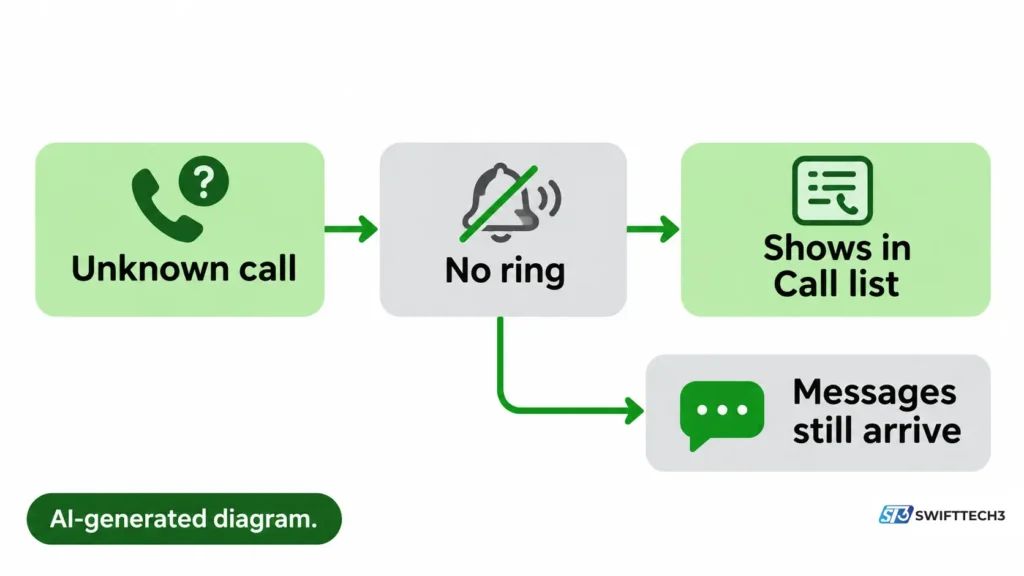
Three details matter:
- It does not block anyone. Messages from the number still arrive. Blocking is a separate control.
- It covers WhatsApp calls only. A normal phone-network call still rings. On an iPhone, regular call filtering is a separate setting in the Phone app.
- “Unknown” may depend on history. Tech On Dicas and an Indian tech site (Smartprix) report that messaging or calling a number can stop future calls from being silenced. I did not find that rule in WhatsApp’s own pages, so treat it as reported, not confirmed.
Meta’s engineering blog, in November 2023, also described a security reason for the setting: calls from unknown numbers do not ring on your device. That is useful if you receive spam calls, but check your Call list during a delivery or a job application.
For wider privacy settings, see our guide to Instagram story privacy settings.
Can you make WhatsApp calls from a browser without the desktop app?
Yes, if the rollout has reached your account. WhatsApp announced on July 28, 2026 that you can make and receive audio and video calls on WhatsApp Web, one-on-one and in groups, without downloading an app.
According to WhatsApp, web calls are end-to-end encrypted, have no time limit and are free. The company calls the rollout gradual and has not published a schedule. If you do not see call buttons, your account may not have the feature yet. Your browser also needs permission to use the microphone, and for video the camera.
The feature was first reported in February 2026 for beta users, according to WABetaInfo and later news coverage. The July announcement is the official launch.
Can one WhatsApp account run on two phones?
Yes, through Linked devices. WhatsApp says you can link a phone as one of up to four additional devices, the same way you link computers and tablets. On your main phone, open Linked devices, choose Link a device, and scan the QR code shown on the second phone.
Do not register the same number again on the second phone. Several guides warn that a fresh registration can unlink your main phone. Review the Linked devices list now and then and remove anything you do not recognize.
How do you turn on Android developer options?
Open Settings, go to About phone, and tap Build number seven times until “You are now a developer!” appears. According to Google’s Android developer documentation, the Build number location varies by maker. On Samsung Galaxy S8 and later it sits under Settings, About phone, Software information.
Developer options exist for profiling and debugging apps, and Google’s page is written for developers. Turning on a setting you do not understand is the main risk. If you only want a specific feature, such as showing taps on the screen, change that one setting and note what it was.
How do you set up Back Tap on an iPhone?
Go to Settings, Accessibility, Touch, then Back Tap, and choose Double Tap or Triple Tap. According to Apple, Back Tap works on iPhone 8 and later and can take a screenshot, open Control Center, run a shortcut or turn on an accessibility feature. To turn it off, set the gesture to None.
Some reviewers report accidental triggers with Double Tap. That comes from secondary coverage, so test it with a low-stakes action first.
How do you reduce mobile data use on Android?
Turn on Data Saver. Google’s Pixel help says it lets most apps use mobile data in the background only over Wi-Fi, while apps you have open can still use mobile data. On Pixel phones the path is Settings, Network & internet, Data Saver. Menu names differ on other brands.
Two limits to know:
- You can exempt specific apps under “Unrestricted data.”
- Google notes that your phone and your carrier may measure usage differently, so your carrier’s figure is the one that counts against a plan.
Tech On Droid published a data-saving post on March 18, 2025, but I did not verify its steps. If you travel, eSIM connectivity may also matter for cost. For battery drain, see our note on keeping devices charged.
What is Facebook’s “Your algorithm” feature?
It lets you add and manage topics you want more or less of in your Feed and Reels. Meta announced it on October 13, 2026. You reach it from the three-dot menu on a post.
Meta says changes show up in recommendations in real time. That is the company’s description, not an independent measurement. The rollout is gradual, and I found no country schedule, so the option may not appear on your account yet. It is separate from ad controls and from tools such as Snooze or Unfollow.
What do the other Tech On Dicas topics cover, and what could we not verify?
Google’s summary also mentions turning older TVs into smart setups, improving home Wi-Fi, and apps for photo editing, vector creation, music identification and document management. I did not find primary-source support for those specific claims in this session. I could not open Tech On Apps, and the Tech On Droid and Tech On Dicas pages I read did not state them.
So this guide leaves out TV, Wi-Fi and app-ranking advice. Before following that kind of tip, check your TV’s model number and operating system, and use official app stores. PC Tech Magazine’s guide makes the same point about matching instructions to your device. See also our piece on mobile app security and data protection.
What goes wrong when you follow a tip, and how do you fix it?
| Symptom | Likely cause | What to do |
|---|---|---|
| “Silence unknown callers” is missing | Old app version or different menu wording | Update WhatsApp from the official store and check Privacy, then Calls |
| Unknown number still rings | You may have messaged or called it before (reported, unconfirmed), or it is a normal phone call | Check whether the call came from WhatsApp or the Phone app |
| No call buttons on WhatsApp Web | Gradual rollout | Use the phone or desktop app until it reaches you |
| Second phone unlinked your main phone | It was registered with the number instead of linked | Link it through Linked devices |
| Developer options not visible | Build number path differs by brand | Search your brand’s path in Google’s table or your maker’s support page |
| Back Tap does nothing | Action set to None, or unsupported iPhone | Check Settings, Accessibility, Touch, Back Tap; iPhone 8 or later |
| “Your algorithm” not found | Rollout not on your account yet | Use Show more, Show less, Snooze or Unfollow for now |
How can you check any Tech On Dicas tip yourself?
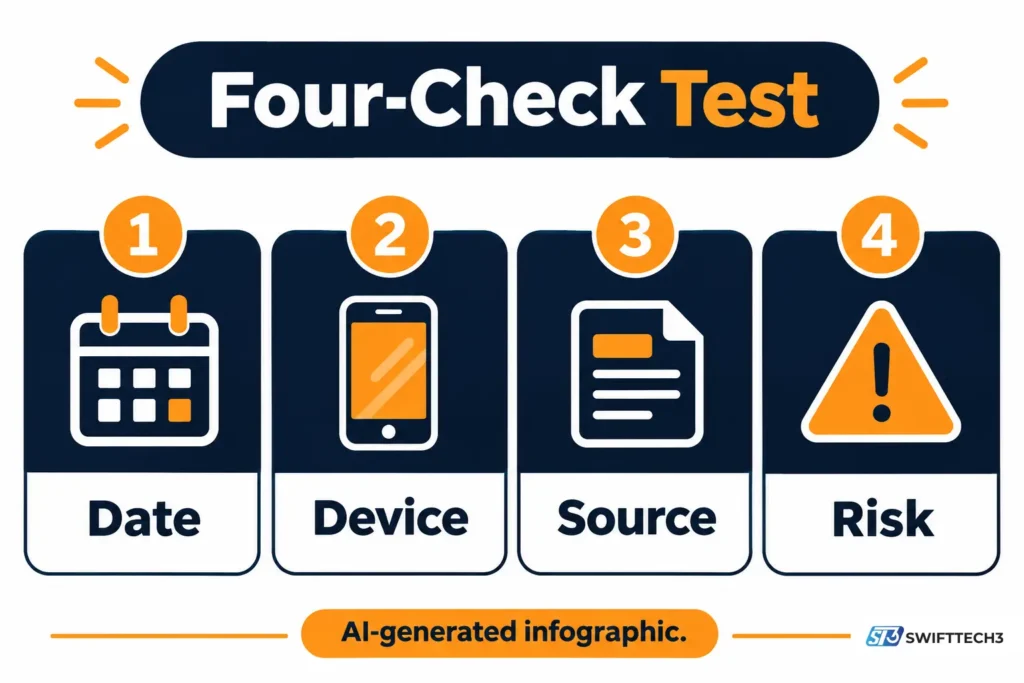
Use the Four-Check Test, a quick checklist built from the checks above. It is a reader aid, not a score.
- Date: does the post say when it was published, and is that after the feature launched?
- Device: does it name your phone, TV or software version?
- Source: does it point to the company that makes the feature?
- Risk: does it say what could go wrong or what the setting does not do?
On the pages I read, the homepage footer warns readers never to send money or personal data to third parties and says the site promotes only free app downloads. That is the site’s own statement. I could not confirm who operates it beyond the “ceo dicas” byline.
FAQs
Is Tech On Dicas free to read?
The pages I opened needed no login or payment. The site’s footer says it promotes only free app downloads. Pages on other sites that use the same name are separate.
Is there an official Tech On Dicas app?
I found no confirmation of one. The techondicas.com homepage I read listed no app download, and PC Tech Magazine says an APK search does not prove an official app exists. Use Google Play or the App Store, and check the developer name.
Who runs Tech On Dicas?
Posts are bylined “ceo dicas.” The pages I read did not name a person or company. The site has contact and privacy pages that I did not open.
Does Tech On Dicas publish in English?
No. The site is in Brazilian Portuguese. English articles about it are independent guides.
Does silencing unknown callers block them?
No. Silenced calls stop ringing but stay in your Call list, and messages still arrive. Blocking is a separate WhatsApp control.
Is WhatsApp Web calling available to everyone?
WhatsApp announced it on July 28, 2026 and calls the rollout gradual, with no published schedule. If you see no call buttons, your account probably does not have it yet.
Are Android developer options safe to turn on?
Turning them on is not harmful in itself, but the settings are meant for debugging. Change only what you understand and note each change so you can undo it.
Conclusion
Tech On Dicas is a Portuguese-language tips blog, and the posts I checked matched official announcements from WhatsApp, Apple and Meta. The main risks are name confusion and menus that differ by language and device. Your next step: pick one tip, such as silencing unknown WhatsApp callers, and confirm the menu path against WhatsApp’s own announcement before you change the setting.
Related: Secure WPS Office download guide
Disclaimer: This article is for informational purposes only and is not affiliated with, sponsored by or endorsed by Tech On Dicas, WhatsApp, Meta, Apple, Google or any other brand mentioned. Features, menus, rollouts and policies can change, so confirm settings with each company’s official documentation. Information last verified on November 11, 2026. Changing phone, account or privacy settings can affect your data, so back up important files first, and note that AI output can be inaccurate.