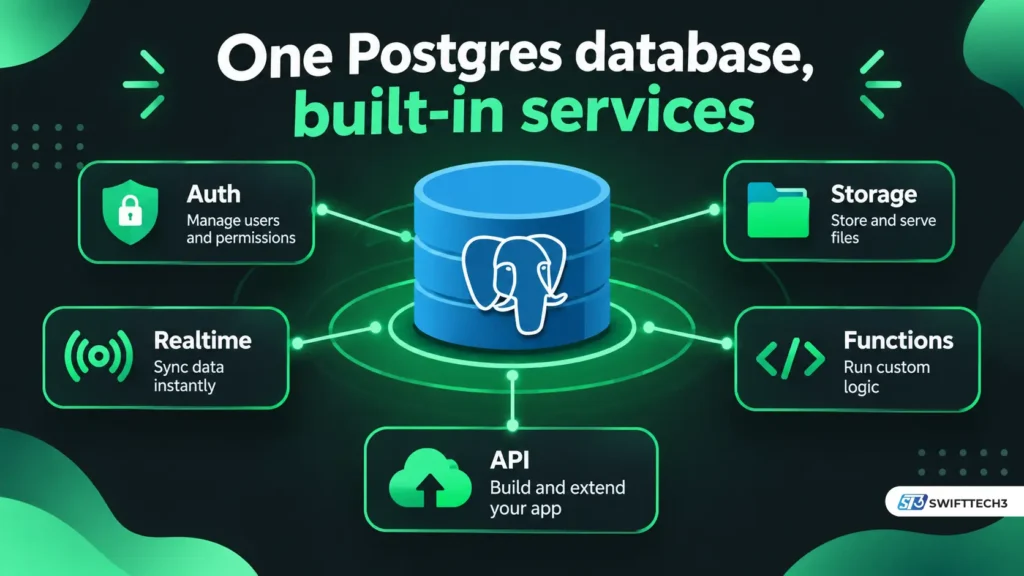
Supabase is a Postgres development platform that gives each project a dedicated Postgres database, plus authentication, auto-generated APIs, file storage, Realtime and Edge Functions. Its code is open source, and you can use the hosted service or self-host. As of November 2026, the hosted Free plan costs $0 and Pro starts at $25 per month.
You build a to-do app in an afternoon. There is a sign-up form, a table and a list on screen, and no server code. Then you deploy, and the list comes back empty or throws “permission denied for table.” The gap between how fast Supabase starts and what you still have to configure is the part most explainers skip.
This guide covers what Supabase includes, what it costs with worked examples, what changed in 2026, how to secure it, and where it falls short.
What does Supabase include?
Supabase bundles a Postgres database with the services most apps need around it. According to Supabase’s architecture documentation, each project is a set of open-source tools that all talk to one Postgres instance.
| Component | What it does | Tool underneath (per Supabase docs) |
|---|---|---|
| Database | Dedicated Postgres, accessible with full privileges | PostgreSQL |
| Auth | Issues JWTs and manages users; works with row-level security | GoTrue |
| Data API | Turns your tables into a REST API | PostgREST |
| GraphQL API | Reflects your schema as GraphQL | pg_graphql extension |
| Realtime | Streams database changes, broadcasts messages, tracks presence over WebSockets | Elixir server |
| Storage | S3-compatible object storage, with metadata and permissions in Postgres | Storage API |
| Edge Functions | Server-side TypeScript run close to users | Deno-compatible Edge Runtime |
| Connection pooler | Manages database connections | Supavisor |
| API gateway | Routes traffic to the services | Envoy |
| Dashboard | Table editor, SQL editor, policy tools | Studio |
On top of these, Supabase lists Vector (embeddings stored with pgvector), Cron and Queues as modules. Its site also lists a “Compute” product as private alpha, so don’t plan around it.
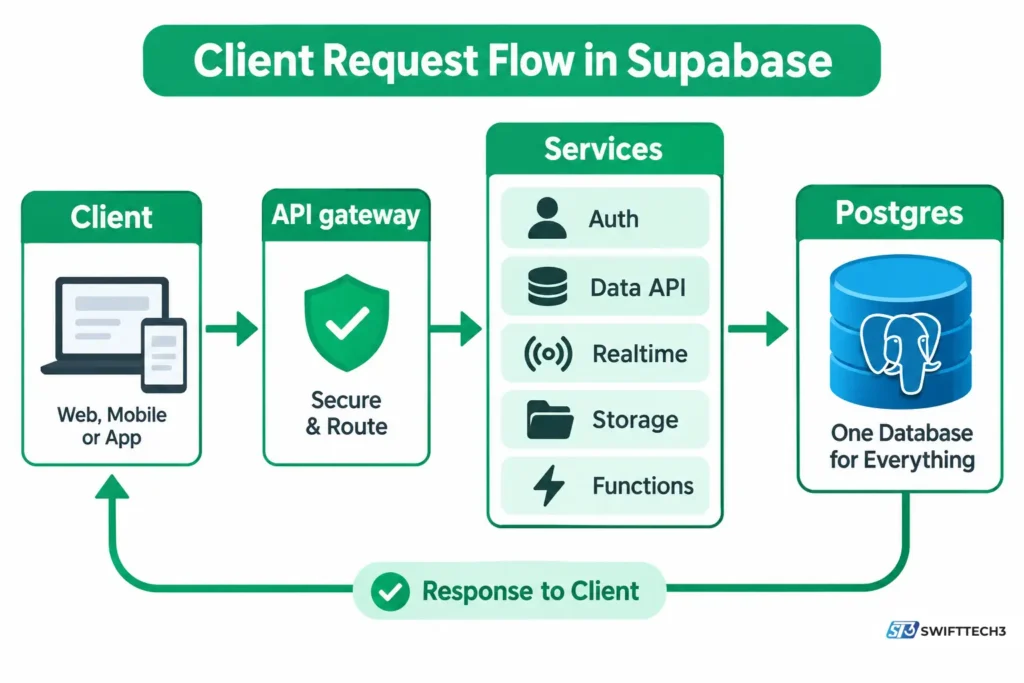
What most people miss: Supabase does not hide Postgres. The documentation says you can use the database with full privileges. That is a strength, but it also means you own the security rules.
Is Supabase a database or a backend?
It is both. It is a hosted Postgres database plus backend services (auth, storage, realtime, functions) built around it. Supabase’s own label is “Postgres development platform.”
The phrase “open-source Firebase alternative” comes from Supabase’s GitHub README. The same README says Supabase is not a one-to-one mapping of Firebase. The real difference is the data model: Postgres tables instead of a document store.
Your business logic still has to live somewhere. That can be SQL and database functions, Edge Functions, or your own server.
Is Supabase free?
Yes, there is a Free plan. It has limits that matter for real products. According to the official pricing page as of November 2026, Free includes:
- 50,000 monthly active users
- a 500 MB database
- 1 GB of file storage
- 5 GB of egress
- unlimited API requests
- 500,000 Edge Function invocations a month
Free projects are paused after one week of inactivity, and you can have only two active projects. The pricing page lists automatic backups and point-in-time recovery as not included on Free.
| Plan (Nov 2026) | Base price | Notable inclusions | Notable limits |
|---|---|---|---|
| Free | $0 | 50,000 MAU, 500 MB database, 1 GB storage | Pauses after 1 week idle; 2 active projects; 50 MB max upload; no automatic backups |
| Pro | From $25/month | 100,000 MAU, 8 GB disk, 250 GB egress, 100 GB storage, daily backups kept 7 days, email support | Spend cap on by default; overages billed if cap is off |
| Team | From $599/month | SOC2 and ISO 27001 listed, 14-day backups, 28-day log retention, priority email support | HIPAA is a paid add-on |
| Enterprise | Custom | Uptime SLAs, PrivateLink, 24×7 support | Contact sales |
Compute is billed separately. Paid plans include $10 per month in compute credits, which covers one Micro instance. The sizes below are from the pricing page.
| Compute size | Price/month | Memory | Type |
|---|---|---|---|
| Micro | $10 | 1 GB | Shared |
| Small | $15 | 2 GB | Shared |
| Medium | $60 | 4 GB | Shared |
| Large | $110 | 8 GB | Dedicated, 2 vCPUs |
Here are cost examples calculated with code on November 8, 2026 from those listed rates. They are illustrative scenarios, exclude tax, and assume the spend cap is turned off where usage exceeds included amounts.
| Scenario (Pro plan) | Calculation | Monthly total |
|---|---|---|
| One project, Micro compute | $25 + $10 − $10 credit | $25 |
| Two projects, both Micro | $25 + $20 − $10 | $35 |
| One project, Small compute | $25 + $15 − $10 | $30 |
| One project, Large compute | $25 + $110 − $10 | $125 |
| One Micro project, 150,000 MAU | $25 + 50,000 × $0.00325 | $187.50 |
| One Micro project plus point-in-time recovery | $25 + $100 | $125 |
| 400 GB egress (250 GB included) | 150 GB × $0.09 | $13.50 extra |
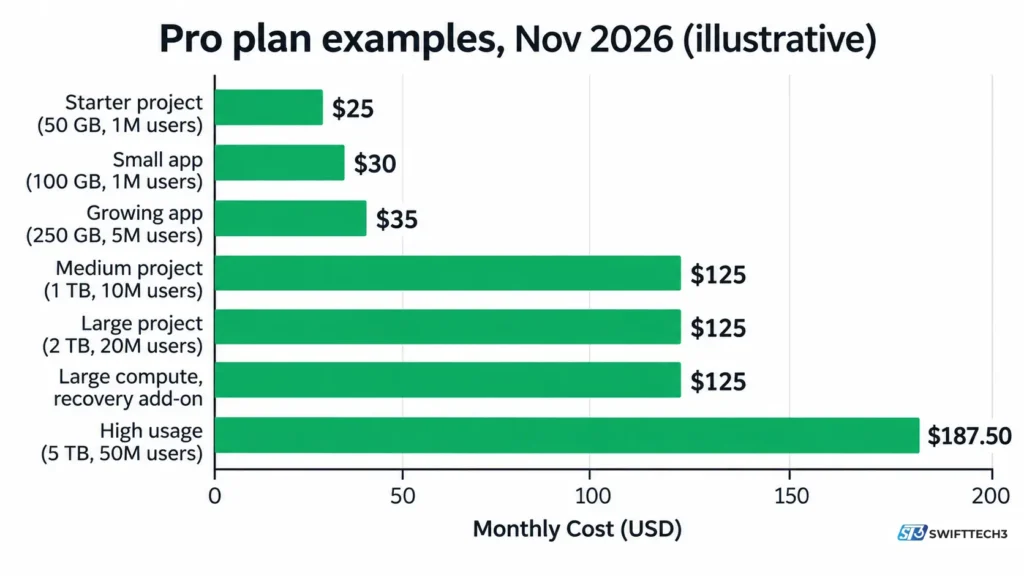
The cost most people don’t expect is auth volume. Going from 100,000 to 150,000 active users adds $162.50, more than six times the base plan price.
How does a request reach your data?
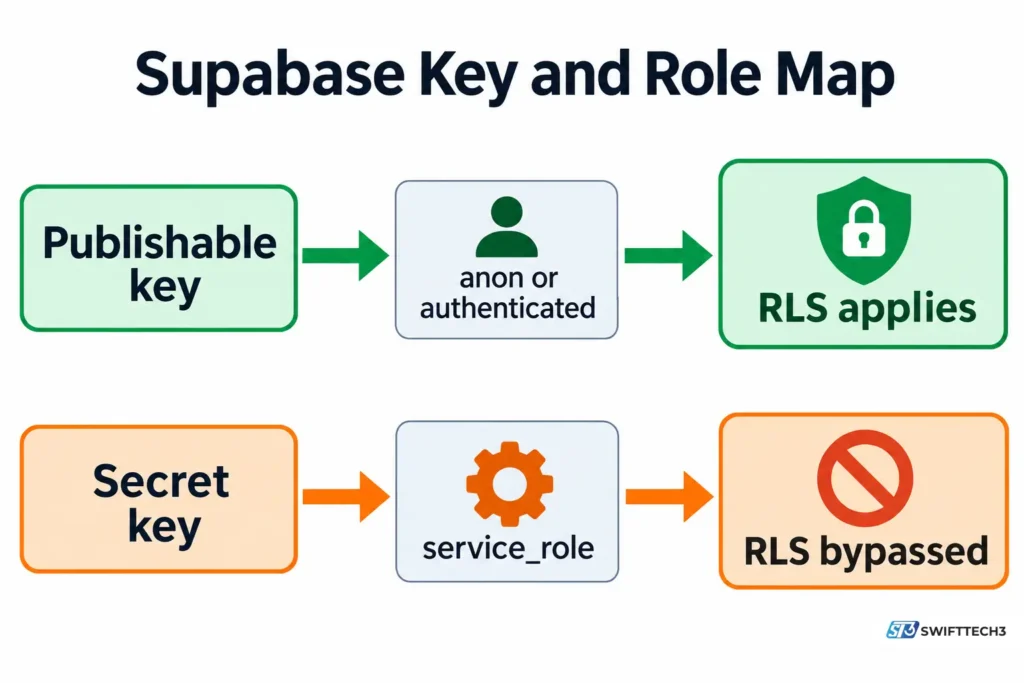
Every request carries an API key, which tells Supabase which application is calling. Supabase Auth then identifies which signed-in user is calling. According to Supabase’s API keys documentation (updated November 2, 2026), each key maps to a Postgres role, and your row-level security (RLS) policies match on that role.
| Key | Where it belongs | Postgres role | Subject to RLS? |
|---|---|---|---|
Publishable key (sb_publishable_...) | Browser, mobile app, scripts | anon (signed out) or authenticated (signed in) | Yes |
Secret key (sb_secret_...) | Servers, Edge Functions, cron jobs only | service_role | No, it bypasses RLS |
Two details trip people up.
- A publishable key does not make your user anonymous. The app uses the key while the user signs in separately.
- Postgres checks table grants before RLS. A missing grant returns a permission error. A policy that matches no rows returns an empty result.
Supabase says the legacy anon and service_role keys are being deprecated by the end of 2026. The documentation notes that long keys starting with eyJ come from older tutorials.
For apps that grow past a prototype, why web applications stop scaling covers the architecture choices that sit outside any one backend.
What changed in Supabase in 2026?
The biggest change is how new tables are exposed to the API.
| Date | Change | Source status |
|---|---|---|
| April 28, 2026 | New projects can opt out of automatically exposing new public tables to the Data API and GraphQL API | Supabase changelog |
| May 30, 2026 | That behavior becomes the default for new projects | Reported by independent write-ups citing the changelog; not confirmed on a primary page |
| October 30, 2026 | Same default reaches existing projects; existing tables keep their grants | Stated by Supabase staff in the official GitHub changelog discussion |
| By end of 2026 | Legacy anon and service_role keys deprecated | Supabase API keys documentation |
| pg_graphql 1.6.0 | GraphQL introspection is off by default and must be enabled per schema | Supabase GraphQL documentation |
One caveat on the October 30 row. The Securing your API page I read (updated October 22, 2026) still described the older default for existing projects. Check your own project’s Data API settings rather than assuming.
So the claim that creating a table automatically creates REST and GraphQL APIs is now outdated for many projects.
Why does my new table return “permission denied”?
A new table likely has no grant for the role making the request. Grants decide whether a role can reach a table over the Data API. RLS decides which rows it can see.
| Symptom | Likely cause | Fix |
|---|---|---|
permission denied for table (code 42501) | The role has no grant on the table | Grant only the privileges each role needs, in the same migration as your RLS setup |
| Empty result, no error | RLS is on, but no policy matches this role or user | Add a policy for the correct role after confirming grants |
| HTTP 401 using a secret key in a browser | Secret keys are blocked in browsers | Call from a server or Edge Function; use the publishable key in the browser |
| Free project stopped responding | Free projects pause after 1 week of inactivity | Unpause it in the dashboard, or move to a paid plan |
| Realtime connection ends after 24 hours | Public Realtime connections have a 24-hour maximum | Upgrade the connection with Supabase Auth or a supported third-party auth provider |
A minimal pattern looks like this:
sql
grant select, insert, update, delete on public.todos to authenticated;
alter table public.todos enable row level security;
create policy "own rows" on public.todos
  for all to authenticated
  using ((select auth.uid()) = user_id);
Tables created in the Dashboard have RLS on by default. Tables created in the SQL Editor or other tools need it enabled explicitly.
Can you self-host Supabase, and is it really open source?
Yes to both, with limits. The main GitHub repository carries an Apache-2.0 license, and Supabase’s architecture page lists MIT and Apache 2 licenses across its components. According to the self-hosting documentation (updated October 19, 2026), Docker is the recommended route.
| Aspect | Self-hosted Supabase |
|---|---|
| Projects | A single project; Studio has no multi-project or organization support |
| Missing vs hosted | Branching, advanced metrics beyond logs, managed backups and point-in-time recovery, analytics and vector buckets, ETL, Management API |
| Support | Community-supported |
| Your responsibility | Provisioning, security hardening, Postgres maintenance, high availability, backups, monitoring |
| Telemetry | Supabase says self-hosted Supabase does not phone home |
The Supabase CLI’s local stack is not self-hosting. Supabase says it is not hardened for production and must not be exposed to outside traffic.
The hosted service is also not “cloud-agnostic.” Supabase’s regions page lists 17 AWS regions and an early-access request for running the database in your own cloud.
Supabase vs Firebase: which data model fits?
Choose by data shape. Supabase uses relational Postgres. Google describes Firestore, the main Firebase database, as a NoSQL document database.
| Question | Supabase | Firebase (Firestore) |
|---|---|---|
| Core data store | Postgres tables | NoSQL document database (per Google Cloud docs) |
| Relationships between data | Foreign keys, SQL joins | Described differently from traditional databases (per Google) |
| Access control | Postgres grants and RLS policies | Firestore security rules |
Supabase’s documentation calls its Postgres choice deliberate. It also says its cloud and self-hosted products are compatible, and that portability relies on standards like pg_dump and CSV. Those are vendor claims I did not test.
Can Supabase power AI apps?
Yes, for storing and searching embeddings. According to Supabase’s AI and Vectors documentation (updated October 26, 2026), the toolkit uses Postgres with pgvector and supports semantic, keyword and hybrid search.
Supabase’s own changelog gives a reason this matters for AI-generated code. It says a human once reviewed each schema change and enabled RLS table by table, and agents now create tables without that review. That is why the exposure default changed. If an AI tool wrote your schema, check every table. AI engineering workflow automation covers how to build review into that process.
Is Supabase safe for production?
It can be, if you configure all three access layers. The platform provides the controls, but defaults and generated code can leave gaps.
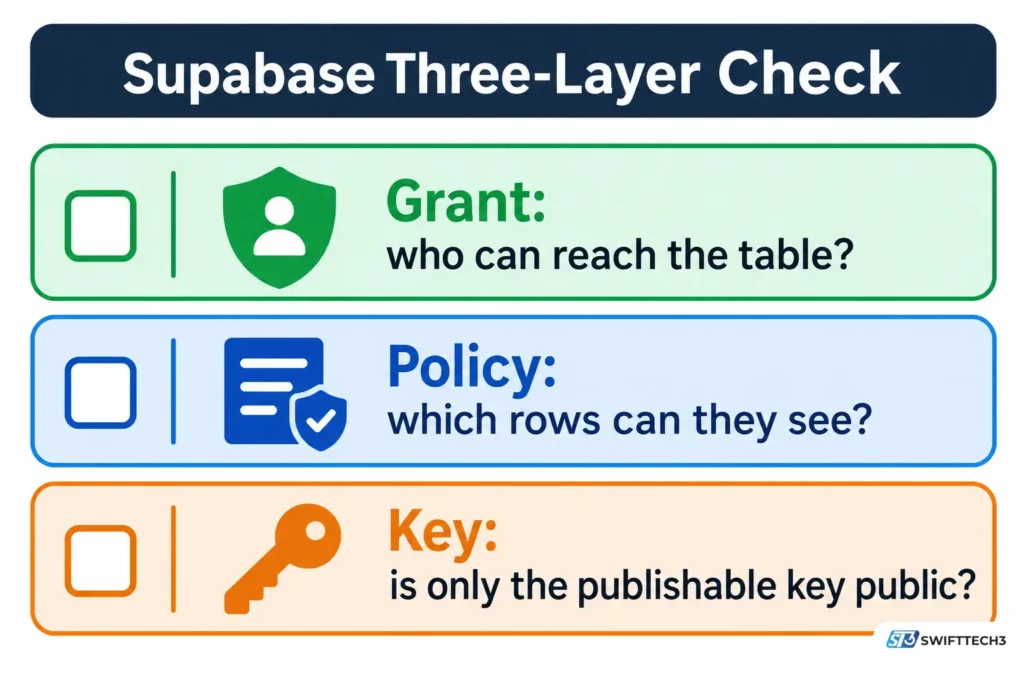
The Three-Layer Check: Grant, Policy, Key (an original checklist built from the verified facts above)
| Layer | Question | How to check it yourself |
|---|---|---|
| Grant | Which roles can reach each table over the Data API? | Review the Data API settings page; query default privileges as shown in Supabase’s Securing your API guide |
| Policy | Is RLS on for every exposed table, with correct policies? | Open Database > Policies; run the Security Advisor |
| Key | Is only the publishable key in client code? | Search your repo and bundles for sb_secret_ and service_role; rotate any leaked key |
If your app never uses the client libraries or REST and GraphQL endpoints, Supabase documents a setting to turn the Data API off entirely.
Common mistakes
- Shipping a secret or
service_rolekey in a browser or mobile app. - Relying on an Edge Function’s JWT check alone. Supabase says it does not authenticate a caller that sends only an API key.
- Running a real product on Free, where projects pause and automatic backups are not included.
- Treating the local CLI stack as a production deployment.
For broader client-side risks, see mobile app security and data protection.
How do you get started with Supabase?
- Create a project in the dashboard. Free allows two active projects.
- Create a table in the Table Editor, which enables RLS by default.
- Add grants and a policy like the pattern above.
- Install the client with
npm install @supabase/supabase-js. - Set environment variables. Supabase’s docs use
NEXT_PUBLIC_SUPABASE_URLandNEXT_PUBLIC_SUPABASE_PUBLISHABLE_KEYfor Next.js. - Query from your app. For example,
supabase.from('todos').select('*').
Supabase publishes quickstarts for React, Next.js, Astro, Vue, SvelteKit, Flutter, iOS Swift, Android Kotlin, Expo, Flask, Laravel and Ruby on Rails, among others.
Who should use Supabase, and who should skip it?
A good fit if:
- Your data is relational, and you want Postgres without running the server yourself.
- You want auth, storage and realtime that share one permission model.
- You may need to self-host later.
- You want embeddings stored beside your application data.
Probably skip it if:
- You want a NoSQL document model. Supabase calls its Postgres choice deliberate.
- No one on your team will own database permissions. RLS and grants are your responsibility.
- You need the full hosted feature set on your own servers. Self-hosting omits several features.
FAQs
What is Supabase used for?
Teams use it as the backend for web, mobile and AI apps. It provides a Postgres database, user sign-in, file storage, realtime updates, server-side functions and vector search. Supabase’s homepage markets it for projects from a weekend build to scale.
Is Supabase the same as Firebase?
No. Supabase says it is not a one-to-one mapping of Firebase. It is built on Postgres, while Firebase’s Firestore is a NoSQL document database.
Does Supabase use PostgreSQL?
Yes. Every project includes a dedicated Postgres database, and Supabase says it does not abstract the database away. You can connect with full privileges.
Can I use Supabase without knowing SQL?
For basic work, the dashboard’s Table Editor helps. Access rules are written as Postgres policies in SQL, though, so you will need some SQL before launching.
What happens to an idle free project?
Free projects are paused after one week of inactivity. Supabase says you can unpause them, and paid plans aren’t paused for inactivity.
Is Supabase safe?
Supabase lists SOC2 Type 2, HIPAA and ISO 27001 on its site, and its pricing page ties SOC2 and ISO 27001 to Team and above. Safety in your app still depends on your grants, RLS policies and key handling.
Can you self-host Supabase?
Yes, using Docker, and it is community-supported. It runs as a single project and lacks features such as branching and managed backups.
Does Supabase support vector search?
Yes. The AI toolkit stores and searches embeddings using Postgres and pgvector, with semantic, keyword and hybrid search.
Conclusion
Supabase is Postgres plus the services around it, and it is strongest when your data is relational. As of November 2026, the pricing is clear, but costs grow with compute, auth volume and egress. Access rules are also changing, with new tables no longer exposed to the API by default.
Next step: Create a free project, add one table, and run the Three-Layer Check before storing any real user data.
Related: app performance metrics that drive user retention
Disclaimer: This article is for informational purposes only and is not affiliated with, sponsored by or endorsed by Supabase, Google, Firebase or any other brand mentioned. Prices, features and policies may change, and information was last verified on November 8, 2026. Misconfigured access rules or exposed keys can leak user data, so test your security settings before storing real user information.