Software Qugafaikle5.7.2 could not be verified as a real, released product. As of November 2026, searches of PyPI, npm, crates.io and GitHub returned no project by this name, and no identifiable developer, official website or documentation was found. Treat any installer offered under this name as untrusted.
You searched for a coding tool, found a dozen install guides, and still could not find one download page run by the people who made it. That gap is the main finding, not a missing link.
This guide covers what the guides claim and where they contradict each other. It also covers what we could and could not verify on November 6, 2026, and how to check any unfamiliar software before it touches your computer.
Is Software Qugafaikle5.7.2 a real product?
Not in any way you can verify today. Nobody has published a developer name, an official website, documentation, a package listing or a changelog that you can inspect.
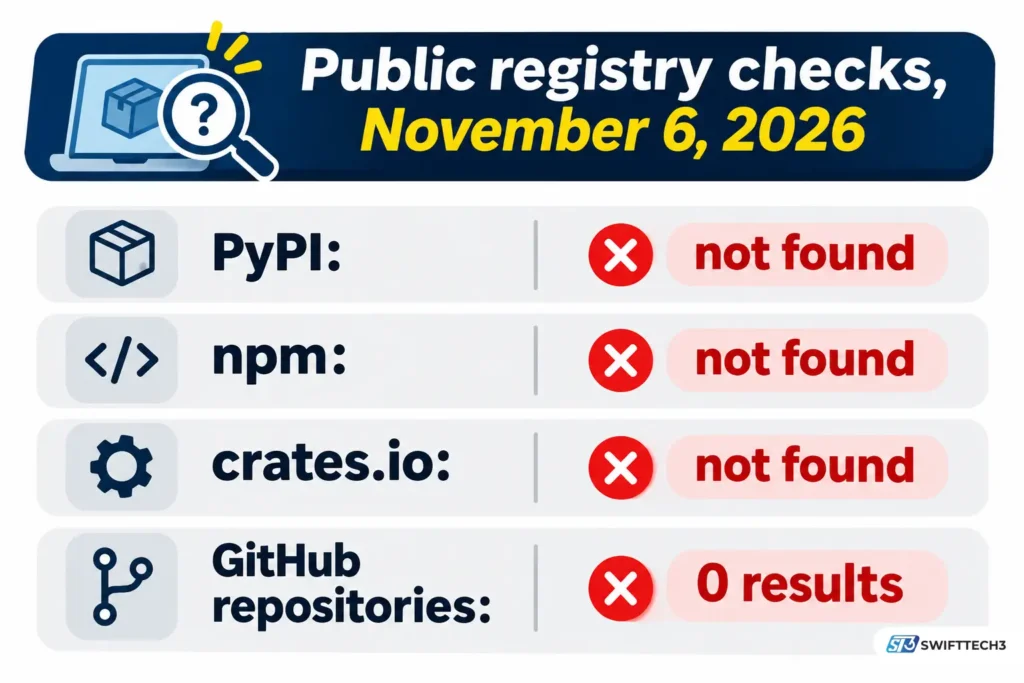
Here is what we checked on November 6, 2026:
| Where we looked | What we did | Result |
|---|---|---|
| PyPI (Python packages) | Looked up the names “qugafaikle”, “qugafaikle5.7.2” and “qugafaikle572” | Not found |
| npm (JavaScript packages) | Looked up the same three names | Not found |
| crates.io (Rust packages) | Looked up “qugafaikle” | Not found |
| GitHub | Ran a repository search and a user search for “qugafaikle” | Zero results for each |
| Web search | Searched for an official website, developer, repository and download page | Only blog posts, social posts and a few skeptical analyses; no page run by a developer |
A name missing from public registries does not prove the software does not exist. Private and internal tools never appear there. What it does prove is that nobody has published anything you could download, read or audit.
Several independent write-ups reach the same conclusion in their own words: no identifiable developer, no verified company site, no official documentation and no listing on major software marketplaces.
What do the guides say it does, and do they agree?
They do not agree. Different pages describe Qugafaikle5.7.2 as a coding and debugging tool, a business automation platform with AI features, and a data-processing platform. No vendor description exists to settle it.
As of November 2026, these are the main claims and their status:
| Claim | What different pages say | Status |
|---|---|---|
| What it is | A lightweight coding, debugging and project tool; an AI-powered business workflow platform; a data-processing and API integration platform; a “script module” | Unpublished. No vendor definition exists. |
| Release date | October 15, 2023 on one page; “not announced, expected Q4 2025” on another; “August to September 2025” on a third | Contradictory and unconfirmed |
| Price | A free basic version with paid advanced features; a free open-source version with a license key for enterprise plugins; a subscription for enterprise features | Unpublished. No pricing page found. |
| Platforms | Windows 10+, Ubuntu 18.04+, macOS 10.14+ on one guide; Ubuntu 20.04+, newer macOS and containers on others | Unpublished |
| Installation | A .deb package installed with sudo dpkg -i; a .tar.gz fetched from example.com, a generic placeholder domain; a Docker image | Unverified. We found no real download location. |
| Security | AES-256 encryption and biometric authentication on some pages | Unpublished. No security documentation found. |
| Open source | One page lists an “open-source build” on GitHub | Not supported by our check: GitHub repository search returned zero results |
Look closely at how these pages are built. Several repeat the same question headings, such as “When was it released?” and “Can I get it?”, while their own text admits the date is unconfirmed. At least two pages we read contain leftover template text, including a bracketed placeholder where a source should be.
The most widely repeated install guide, a May 16, 2025 post on a blogging platform, tells you to “visit the official website” but never names or links one. In that guide, the product name links to a third-party blog post, not to a developer.
What most people miss about the version number
A version number is free to write. Anyone can type “5.7.2” next to a made-up name.
The Semantic Versioning 2.0.0 specification defines the format as MAJOR.MINOR.PATCH. It says the patch number rises for backward-compatible bug fixes. If Qugafaikle followed that convention, a 5.7.2 release would be a small fix. Yet several pages credit 5.7.2 with a redesigned interface, new encryption and an AI engine.
Another detail: the most-cited guide lists Ubuntu 18.04 as a supported minimum. According to Canonical, Ubuntu 18.04 LTS reached the end of standard support on May 31, 2023. A requirements list that names an operating system two years past standard support, in a 2025 guide, was not copied from a current vendor page.
Is Software Qugafaikle5.7.2 safe to download?
There is no verified download to judge, so the safe answer is no. Do not install anything offered under this name.
We found no evidence that it is malware. The problem is that nobody can show you what you would be running. That leaves you unable to check:
- Who published it. Without a named publisher, there is no signature or reputation to check.
- What it does. There is no documentation, source code or security policy.
- Where the real file lives. Every “official website” mention in the guides points nowhere.
The install steps carry their own risks. The Linux instructions use sudo, which means an unknown package would run with administrator rights. The macOS steps tell you to click “Open” if a warning appears, without explaining the warning or how to check the file. That warning exists to protect you. Dismissing it on advice from an anonymous guide defeats its purpose.
For more on spotting low-quality tech content, see this guide on how to spot fake guide content. If someone sent you a link to this software, online fraud prevention is worth a read.
What should you do if you already installed it?
Act as if you ran any untrusted program. You do not need to panic, but you do need to clean up.
- Stop using it and uninstall it from your system’s app settings.
- Run a full scan with up-to-date security software.
- From a different, clean device, change the passwords for accounts you used on that machine.
- Review any permissions or administrator access you granted during setup.
- If it is a work device, tell your IT team.
How can you verify any unfamiliar software yourself?
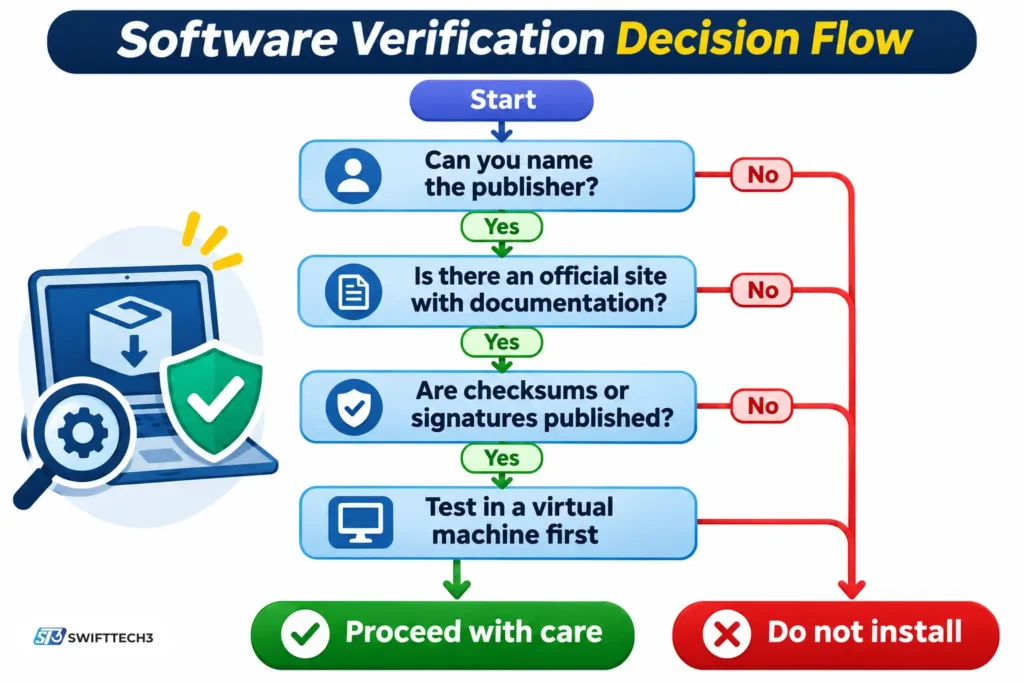
Work through this checklist before you install anything. It mirrors the checks we ran.
- Name the publisher. You need a company or developer name that exists independently of the guides.
- Search the package registries. Look up the exact name on PyPI, npm, crates.io and GitHub. An established tool will show up in at least one.
- Find documentation and a changelog on the publisher’s own site. A real release has dated notes. Date, version and features should match across sources.
- Look for published checksums or code signatures. Compare them against your downloaded file, using values from the publisher’s site, not a forum.
- Check the page that hosts the download. A page that exists only to host a download and has no other content is a warning sign.
- Test in a disposable virtual machine first. Never test unknown software on the computer that holds your work or banking.
What mistakes do guides for this software encourage?
- Turning off antivirus. One troubleshooting guide for this name suggests disabling antivirus if the program will not open. A program that security software blocks is exactly the program to be careful with.
- Trusting the number of guides. Dozens of pages repeating the same claims is not independent confirmation.
- Clicking the first “official website” result. Fake download pages often rank for newly trending names.
- Granting admin rights to get past an installer. Never do this for software whose publisher you cannot name.
- Treating a version number as a release history. See the section above.
What can you use instead for coding, debugging and project work?
Established tools do what the guides claim, and their features are documented. The most-repeated claim is a coding tool with breakpoints, variable watching and plugins.
| Need | Established option | What its own documentation confirms |
|---|---|---|
| Code editing and debugging with extensions | Visual Studio Code (Microsoft) | Debugging with breakpoints, a variables view, a watch view and a call stack; debugging extensions from the Visual Studio Marketplace |
| Full IDE debugging | Visual Studio (Microsoft) | Stepping through code, inspecting variables and setting watches |
| Workflow automation | Depends on your needs | See AI-assisted workflow automation for how to evaluate tools |
Check each vendor’s current pricing and system requirements on its own site, as of the date you read it.
Does anything else share the name Qugafaikle?
In the searches we ran, nothing else did. The variants you will see all point to the same unverified name:
| Variant | Where it appears | What it refers to |
|---|---|---|
| Software Qugafaikle5.7.2 | Blog titles and search queries | The unverified name in this article |
| New software name Qugafaikle5.7.2 | Titles of several guides | Same |
| Qugafaikle (no version) | Pages describing a “series” of releases | No verified product series found |
FAQs
What is Software Qugafaikle5.7.2?
It is a name that appears across blogs and social posts, described inconsistently as a coding tool, a business automation platform or a data-processing tool. As of November 2026, no developer, official site or documentation confirms any of those descriptions.
Can I download Software Qugafaikle5.7.2?
We found no verified download location. The install steps in popular guides never name a real source, and one Linux example fetches a file from a placeholder domain. Do not download it from third-party pages.
When was Software Qugafaikle5.7.2 released?
There is no confirmed release date. Pages give October 15, 2023, a Q4 2025 window and an August to September 2025 window. Those claims contradict one another and none cites a primary source.
Is Software Qugafaikle5.7.2 free or open source?
Pages disagree: some say a basic version is free, others say it is open source, others mention subscriptions. We found no pricing page, license or repository. A GitHub search for the name returned zero repositories on November 6, 2026.
What are the system requirements?
One popular guide lists Windows 10+, Ubuntu 18.04+ and macOS 10.14+, with 4 GB of RAM, 500 MB of disk space and a 1.5 GHz processor. No vendor publishes these figures. The Ubuntu 18.04 entry is also past Canonical’s standard support date of May 31, 2023.
Is Software Qugafaikle5.7.2 a virus?
We found no evidence either way, because there is no verified file to examine. The risk is that you cannot confirm what an installer from an unknown source contains. Until a publisher can be identified, treat it as untrusted.
Who makes Software Qugafaikle5.7.2?
No developer or company has been identified. Several analyses and our own searches found no verifiable publisher.
What should I do if someone asks me to install it?
Ask them for the publisher’s name and the official page it came from. If they cannot give you both, decline. If the request comes by email or message, confirm it through a separate channel.
Key takeaways and next step
Software Qugafaikle5.7.2 has no verifiable developer, website, documentation, package listing or release history. The guides describing it contradict each other on what it is, when it came out and what it costs. A version number and a confident tone are not evidence.
Next step: before you install any unfamiliar tool, run the six-step checklist above. If you cannot name the publisher, do not install it.
Related: secure software download guide
Disclaimer
This article is for informational purposes only. It is not affiliated with, sponsored by or endorsed by any brand, product or organization mentioned, and details may change after the date below. Information last verified on November 6, 2026. Downloading unverified software carries security risks, and AI-assisted content can contain errors, so confirm important details before acting.