Sakura AI is free to download, and the app store listings disagree on who is old enough to use it. Its own terms say users must be over 18, yet the Google Play listing we read shows a 12+ rating and the Apple App Store shows 16+.
Sakura AI (sakura.fm) is an AI character-chat and roleplay platform made by Sakura AI, LLC. You chat with user-made characters or build your own. This guide covers what the product is, what each plan costs, how the age and privacy rules read, and who should skip it. Everything below comes from the official website, its terms and privacy policy, and the Apple and Google store listings, read on November 5, 2026.
What is Sakura AI?
Sakura AI is a character-roleplay chat service, not a customer-service tool or a general assistant. The Apple App Store listing describes “User-Generated AI Characters” you can chat with or create. It also says you can customize a character’s appearance and “way of thinking.”
It runs as a website at sakura.fm and as an iPhone/iPad app and an Android app. The site’s navigation has Explore (browse characters), Create (build one), and Sakura+ (paid plans).
The App Store description also lists uses such as roleplay adventures, a “friend who’s always there to listen,” and a productivity assistant. Treat that last item as marketing copy. Nothing in the official materials we read shows it working as a business or office tool.
Is this the Sakura you mean?
Several unrelated products use the name Sakura, and one top-ranking page describes the wrong one. Check the developer name before you download anything.
| Name you may see | What it is | How to tell it apart |
|---|---|---|
| Sakura AI / Sakura FM (sakura.fm) | Character chat and roleplay | Developer: Sakura AI, LLC; Jacksonville, Florida |
| Sakura (manga reader) | A mobile and web app for reading manga, anime and novels. Its privacy policy also covers Solana wallet and crypto trading features | Separate company and privacy policy |
| Sakura (small-business support agent) | An AI agent that replies to customer messages for shops | Aimed at businesses, not roleplay |
What most people miss: the HitPaw page in the top results presents Sakura AI as a customer-support and business chatbot. That does not match the official site, the app store listings or the terms, which all describe a character-chat product.
Is Sakura AI free?
Yes, you can chat for free, but the free plan has a daily message limit, and the official pricing page does not say what the limit is. As of November 2026, the site’s pricing page lists a Free tier, Diamond at $19 a month, and Infinite at $39 a month.
| Plan | Price | What the official page says you get |
|---|---|---|
| Free | $0 | Daily message limit (number not published) |
| Sage (community) | $0 | Apply by supporting Sakura on YouTube, TikTok or Twitter; a separate “Free Messages” option is applied for in Discord |
| Diamond | $19/month | No daily message limit, the Dragonfruit model (better memory, “vivid responses”), Fusion Mode (several response variants per message) |
| Infinite | $39/month | Everything in Diamond plus the Glowing Dragonfruit model, Ultra-Immersive Images and Infinite Memory |
| Gold | $5 (App Store only) | Perks not published. We found Gold only in the App Store’s in-app purchase list, not on the web pricing page |
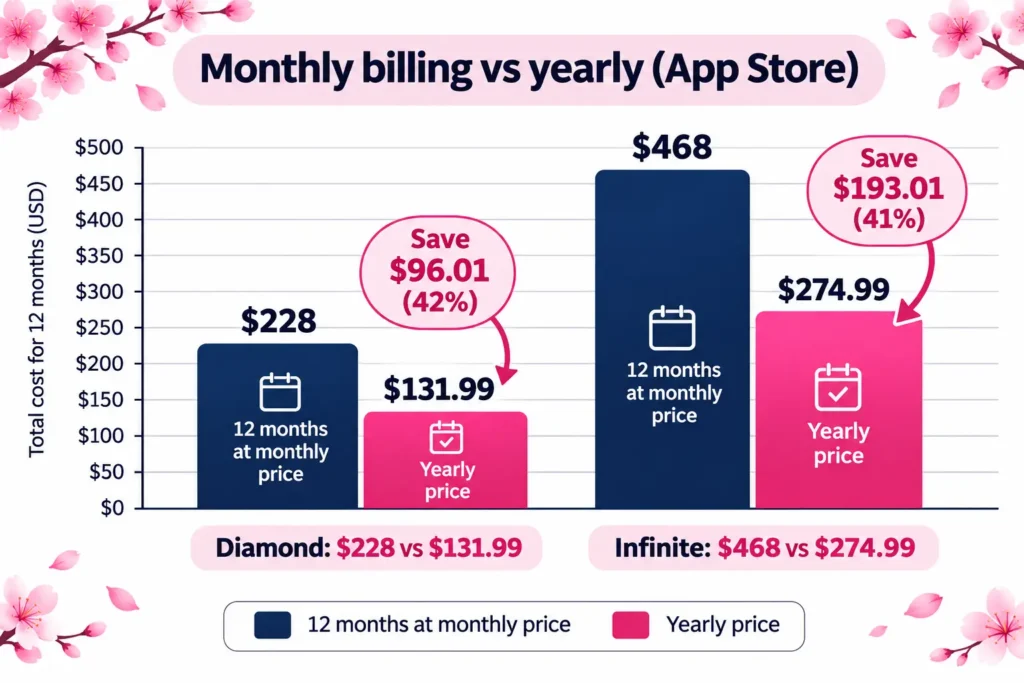
The pricing page also offers a yearly toggle labeled “Save 40%.” We could not see the yearly web prices. The App Store lists yearly options at $131.99 for Diamond and $274.99 for Infinite, and the math works out like this:
| Plan | 12 months at monthly price | Yearly App Store price | Effective monthly cost | Saving |
|---|---|---|---|---|
| Diamond | $228.00 | $131.99 | about $11.00 | $96.01 (about 42%) |
| Infinite | $468.00 | $274.99 | about $22.92 | $193.01 (about 41%) |
Store prices can vary by country and tax. Check the price on the screen where you pay.
Cost trap to know about: the terms say subscriptions bill in advance and renew automatically under the same conditions. Paid fees are non-refundable except where the law requires it, though the company may consider some requests case by case. It can also change fees, with “reasonable prior notice” and effect at the end of your current period. If you subscribed through the app, cancel in the store, because the terms say in-app purchases are managed there.
Is Sakura AI safe? The age problem
Sakura AI’s own terms are strict, and the stores are not. In the terms, you “represent that you are over the age of 18,” and the company “does not permit those under 18” to use the service.
The other documents say different things:
| Source | What it says about age (as read November 5, 2026) |
|---|---|
| Terms of service | Users must be over 18 |
| Privacy policy | The service “does not address anyone under the age of 13”; separate wording about minors under 16 in the California section |
| Apple App Store | Age rating 16+, with “Mature or Suggestive Themes” marked as frequent and “Sexual Content or Nudity” as infrequent |
| Google Play | “Rated for 12+” with “Parental Guidance Recommended” and “Users Interact” |
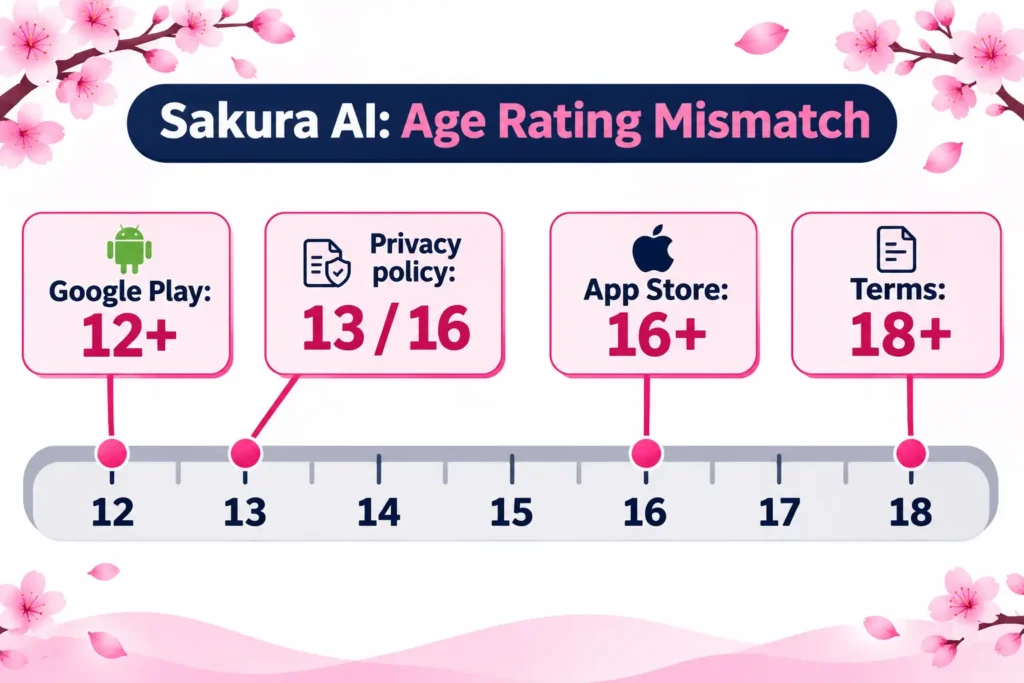
A teenager could install this app without seeing an adult warning at the store level. Parents should not rely on the store rating. The company publishes no age-verification method in the terms or policy that we read, so assume any user can reach the app.
If you are under 18, the terms say you should not use it. If you are a parent, you can block the app with your device’s own controls.
What happens to your chats and data?
The privacy policy is thin on the part users care about most. It was last updated January 6, 2024. In the text we read, it describes collecting email, name, phone, address, usage data, device identifiers and IP address. It does not describe how chat conversations are stored, reviewed or used. It also does not say whether chats are used to train AI models.
What it does say:
- It lists PostHog and Google Analytics for analytics, SendGrid for email, and Apple and Google for in-app payments.
- It says the company does not sell personal information “as the term is commonly understood,” but that providers’ advertising and analytics use “may be deemed a sale” under California law.
- It says security cannot be guaranteed as 100% safe.
- You can request deletion by email or through account settings.
The App Store privacy label is self-reported and not verified by Apple. It lists email address, “Other User Content” and identifiers as linked to you. The purposes include developer advertising or marketing, analytics, product personalization and app functionality. Google Play’s data safety section says data is encrypted in transit and that you can request deletion.
The terms add three practical points:
- Anything you post can be licensed to the company and shown to other users. Public characters you create are the obvious case.
- The company does not guarantee that your content will not be lost or corrupted. Keep your own copies of characters you care about.
- Its liability is capped at the amount you paid, or $100 if you paid nothing.
What to do with this: use an email address you do not mind sharing, leave real names, addresses and workplace details out of chats, and do not type anything you would not want a company or its vendors to be able to access.
What is in the content rules?
The terms ban content that is “unlawful, offensive, upsetting, intended to disgust, threatening, libelous, defamatory, obscene or otherwise objectionable.” The company reserves the right to remove content or limit accounts at its sole discretion.
Third-party reviews disagree sharply about whether adult roleplay is allowed. Some say it is, some say it is banned. We could not find an official published content policy that settles this, so we are not stating either claim as fact. The App Store content descriptors do mark mature themes as frequent.
Myth vs fact
| Myth | What the official sources show |
|---|---|
| “It’s a customer-service chatbot.” | Official materials describe character chat and roleplay |
| “Discord gives you unlimited free messages.” | The official page says you can apply for free messages in Discord. It does not give a number or call it unlimited |
| “No rules, no filter.” | The terms prohibit obscene and objectionable content and allow removal and account limits |
| “It’s rated for teens, so it’s fine.” | The terms say 18+ only |
| “Paid plans are refundable.” | The terms say non-refundable except where required by law or granted case by case |
How do you get started?
- Open sakura.fm or install the app from the App Store or Google Play. Check that the developer is Sakura AI, LLC.
- Create an account. The privacy policy lists Google, Facebook, Instagram, Twitter and LinkedIn as sign-in options, in addition to email. Use email if you want fewer accounts linked.
- Browse Explore for characters, or open Create to build your own.
- Start on the free plan. Judge whether the daily message limit gets in the way before paying.
- If you do subscribe, set a calendar reminder for the renewal date and note whether you paid on the web or in the app, since cancellation happens in different places.
Who should use it, and who should skip it
A reasonable fit: adults who want casual character roleplay or story-style chat, are fine with a daily message limit, and will not share sensitive details.
Skip it if:
- you are under 18, or you are choosing an app for a child;
- you want strong, published privacy commitments about chat logs and AI training, since the policy does not address them;
- you want to pay only after knowing exactly what each plan’s memory and limits are, since the free message cap and Gold perks are not published;
- you need a general-purpose assistant for work. For help choosing one, see this roundup of the best AI tools, and for a sense of how chatbots differ by job, see types of AI chatbots built for a specific purpose.
A simple pre-subscription checklist
This is our own checklist, built from the facts above. The numbers are illustrative.
- Use the free plan for a week. If you hit the daily cap on most days, Diamond solves that directly.
- Decide if you need memory or images. Infinite is the only plan the official page ties to Infinite Memory and Ultra-Immersive Images. If you do not need these, Diamond costs $20 less per month.
- Check the yearly math. At the App Store prices, a year of Diamond ($131.99) costs less than seven months of monthly Infinite ($273).
- Pick a payment route you can cancel easily. Store subscriptions are cancelled in the store.
- Write down the date. Prices and terms can change, and the company can change fees at the end of a billing period.
FAQs
Is Sakura AI the same as Sakura FM?
Yes. The official site is sakura.fm, and the apps are listed as “Sakura – Chat with AI Bots” by Sakura AI, LLC. The terms refer to the application as Sakura FM.
Does Sakura AI have an app?
Yes. It is on the Apple App Store (rated 4.8 from about 22,000 ratings when we read it) and on Google Play (rated 4.7, with the listing showing 1M+ downloads).
Is Sakura AI safe for kids?
No. The terms bar users under 18, and the store ratings do not match that rule. Parents should use device controls rather than the store rating.
Can I cancel Sakura+ any time?
You can cancel renewal in your account settings or in the app store, depending on where you paid. The terms say you keep access until the period ends and receive no refund for the current period.
Does Sakura AI use my chats to train its AI?
The privacy policy does not say. We cannot confirm either way, so avoid sharing sensitive information.
What is Fusion Mode?
According to the pricing page, it gives you “a variety of responses for every message.” It is part of Diamond and above.
Is there a free way to get more messages?
The pricing page offers Sage status through social media support and a Discord application for free messages. Details are not published there.
Conclusion
Sakura AI is a roleplay chat product with a real free tier and two main paid plans ($19 and $39 a month). Its documents are thin where privacy and age are concerned, and its terms and store ratings do not agree. Key takeaways:
- Adults only, per the company’s own terms.
- Gold, the free message cap and chat-data handling are not clearly published.
- Yearly billing through the App Store cuts the cost by roughly 41–42%.
Your next step: use the free plan for a few days, read the terms on sakura.fm yourself, and only then decide whether to pay.
Related: InnerVault AI chatbot
For more on how AI products reach everyday users, see AI in modern digital products.
Disclaimer
This article is for informational purposes only and is not affiliated with, sponsored by or endorsed by Sakura AI, LLC or any other brand mentioned. Prices, features and policies may change at any time, so check the official site and your store before you pay. Information last verified on November 5, 2026. AI output can be inaccurate, and AI chat content may be unsuitable for minors; do not share sensitive personal information in any chat.