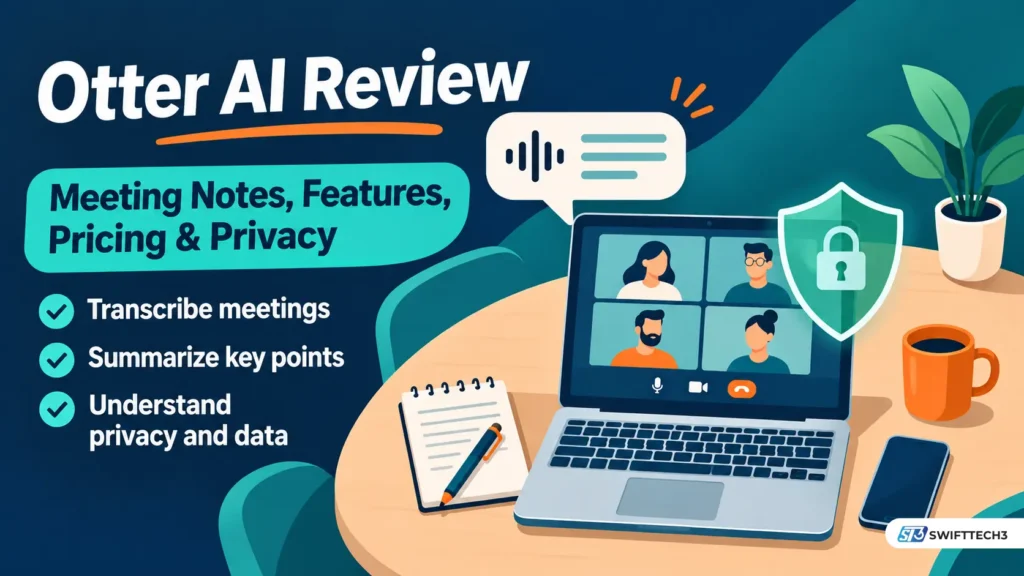
Otter AI is a meeting notetaker that records, transcribes and summarizes calls on Zoom, Google Meet and Microsoft Teams. As of November 2026, the free Basic plan gives you 300 minutes a month but lets you read only the first 30 minutes of each transcript. Pro costs $8.33 a month billed annually. No court has ruled that Otter broke the law. This guide covers cost, limits, privacy, and who should skip it.
What is Otter AI, and which “Otter” are people talking about?
Otter AI is the product of Otter.ai, Inc., a company based in Mountain View, California. The name shows up in several forms, which causes real confusion when you read reviews and court coverage.
| Name you will see | What it means |
|---|---|
| Otter.ai | The company |
| Otter, or “Otter Transcribe Voice Notes” | The mobile app, listed on the US App Store by Otter.ai, Inc. |
| Otter Notetaker | The bot that joins Zoom, Meet and Teams calls as a named participant. This is the name used in the court order |
| OtterPilot | An older name for the same bot, still found in some help pages and press |
| Otter Meeting Agent | Agent branding. In March 2025 Otter introduced a voice-activated version that can answer questions and draft follow-ups. Some outlets use the name for the bot itself |
What most people miss: Otter no longer describes itself as a transcription app. In an October 31, 2026 interview with Fast Company, its CEO called it a “conversation knowledge engine.” That matters because the product now reaches beyond one meeting, into pre-meeting briefs, live prompts during calls, and post-meeting follow-up.
Is Otter AI free?
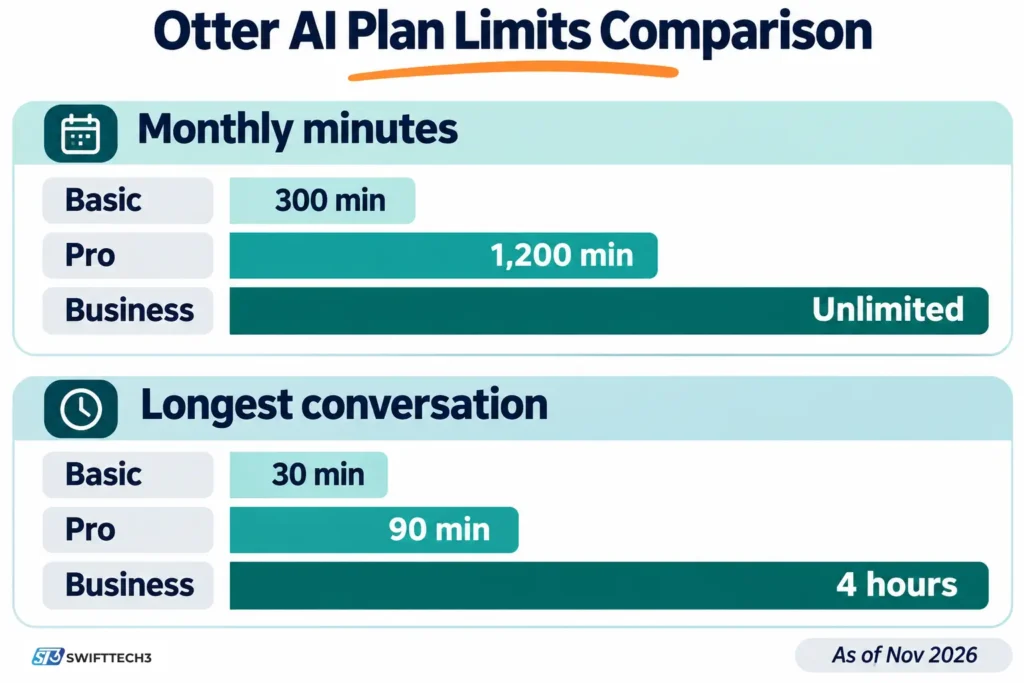
Yes. The Basic plan is free with no end date, but it is a limited plan rather than a full free product. These are the limits that decide whether it works for you, as of October to November 2026.
| Basic plan limit | What it means in practice |
|---|---|
| 300 transcription minutes a month | About ten 30-minute calls. Minutes do not roll over |
| 30 minutes of transcript per conversation | Recording can continue past 30 minutes, but you can only access the first 30 minutes of the transcript until you upgrade |
| 3 file imports for the life of the account | Not 3 a month. Uploading recordings runs out fast |
| 25 most recent conversations visible | Older ones are archived, not deleted |
Two details catch people. First, minutes are one shared pool: live meetings, in-app recordings and imported files all draw from the same 300. Second, Otter’s published material does not say whether minutes past the 30-minute transcript cutoff count against your 300.
If your goal is simply turning one audio file into text, a lighter route may fit better, such as this MP3 to text converter guide.
How much does Otter AI cost in 2026?
Otter Pro is $8.33 per user per month on annual billing ($99.96 a year) or $16.99 on monthly billing. Business is $19.99 per user per month annually ($239.88 a year) or $30 monthly. Enterprise has no public price. The US App Store listing, which we read on November 4, 2026, shows the monthly prices of $16.99 and $30, and Fast Company’s October 31, 2026 report gives the annual totals.
| Plan | Annual billing | Monthly billing | Monthly minutes | Longest conversation | File imports | Team size cap |
|---|---|---|---|---|---|---|
| Basic | Free | Free | 300 | 30 minutes | 3, lifetime | Not applicable |
| Pro | $99.96 a year | $16.99 a month ($203.88 a year) | 1,200 | 90 minutes | 10 a month | 5 billed users |
| Business | $239.88 a year | $30 a month ($360 a year) | Unlimited meetings and in-app recordings | 4 hours | Unlimited, capped at 6,000 imported minutes a month | 25 billed users |
| Enterprise | Custom | Custom | Unlimited | 4 hours | Unlimited | Unlimited |
Plan limits are as published by Otter and reported by independent trackers in October 2026. Prices are in US dollars before sales tax. Promotions change.
The cost math, checked with a calculator script on November 4, 2026:
- Annual billing on Pro saves $103.92 a year (51%) compared with paying monthly.
- Annual billing on Business saves $120.12 a year (33%).
- A team of 5 on Pro annual pays $499.80 a year. A team of 6 must move to Business: $1,439.28 a year.
- A team of 10 on Business annual pays $2,398.80 a year, versus $3,600 monthly.
- One person whose meetings run past 90 minutes pays $139.92 more per year on Business than on Pro.
- Pro’s 1,200 minutes equal 20 hours a month. That is twenty one-hour calls.
Hidden costs and catches:
- The App Store price is not exactly the web price. Pro yearly is $99.99 in the app, against $99.96 on annual billing. Business yearly is $239.99 against $239.88. The gap is small, but the Business plan is not offered through the App Store, according to a developer-answered review on the listing, so team purchases happen on the web.
- There are no refunds. Otter’s help center says subscriptions are non-refundable, according to an independent tracker that read it on October 7, 2026. Cancel at least 24 hours before renewal.
- The Business trial bills the whole workspace. A 7-day trial ends with a charge at the monthly Business rate for every seat unless an admin cancels first, per the same help-center reading.
- Otter’s own pages disagree in places. User counts are one example: the App Store listing says “over 10 million people”, while Otter told Fast Company it has more than 40 million users without splitting out payers. Language lists also differ, covered below. Treat marketing totals as marketing.
What changed with Otter recently?
| Date | Change |
|---|---|
| March 2025 | Otter introduced a voice-activated Meeting Agent that can schedule follow-ups and draft emails |
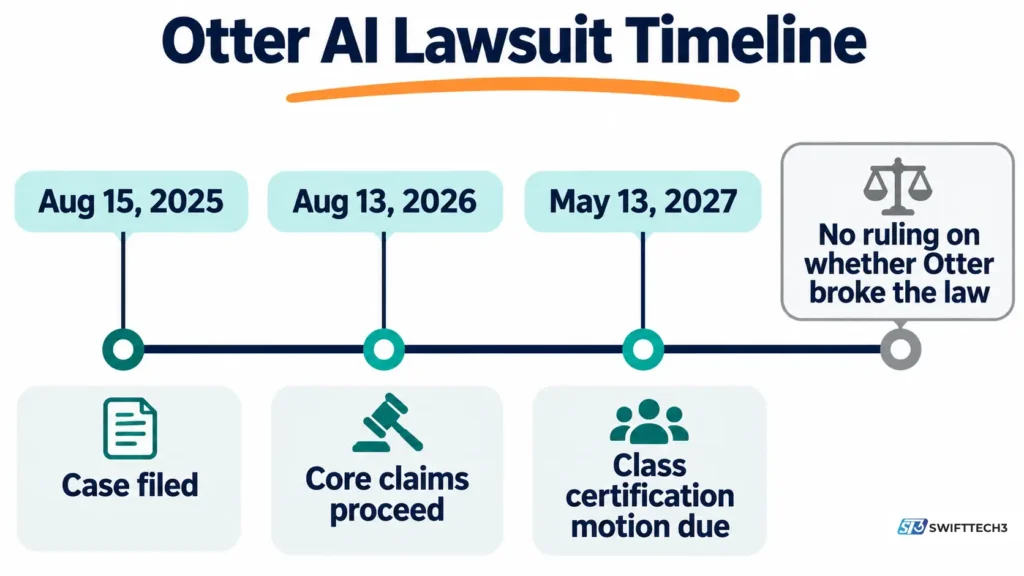
| August 15, 2025 | First privacy class action filed (Brewer v. Otter.ai) in federal court in San Jose, California |
| October 2025 | Otter launched an enterprise suite with an API and an MCP server, which lets outside AI tools query Otter data |
| August 13, 2026 | A federal judge let core wiretap, California privacy and Illinois biometric claims proceed |
| October 31, 2026 | Otter announced Pre-Meeting Brief, Live Assist and a post-call Work Mode, plus a $320 million investment from General Catalyst, per Fast Company |
Live Assist is the one to read carefully. Fast Company reports that other participants will see an Otter notetaker in the meeting window, but its full capabilities are not disclosed to them. For more on how AI tools are changing everyday work, see our AI productivity tools update for 2026.
Is Otter AI safe to use?
Otter’s security basics are standard for the category, and its legal exposure is real but unresolved. Independent reviewers report SOC 2 Type II attestation, AES-256 encryption at rest and TLS in transit. Otter’s CMO also told Fast Company the company encrypts data at rest and in transit.
HIPAA is a separate matter. According to Otter’s published materials, as summarized by independent reviewers, HIPAA support is an Enterprise add-on that requires a signed Business Associate Agreement. Free, Pro and standard Business accounts should not hold protected health information.
What the lawsuit says, and what it does not
The case is In re Otter.AI Privacy Litigation, No. 5:25-cv-06911, in the US District Court for the Northern District of California. Four suits were combined. Seven named plaintiffs from California, Illinois and Washington say Otter Notetaker recorded their conversations without consent from everyone on the call. They also say Otter kept voiceprints and used conversations to train its speech and machine-learning models. Otter denies the allegations.
Here is what Judge Eumi K. Lee wrote in her August 13, 2026 order, which we read in full:
- Allowed to proceed: the federal Wiretap Act claim, the California Invasion of Privacy Act section 631 claim, two Illinois Biometric Information Privacy Act claims, and unfair-competition, unjust-enrichment and declaratory-judgment claims.
- Dismissed with leave to amend: the Computer Fraud and Abuse Act claims, a California computer-fraud claim, the Washington Privacy Act claim, and some intrusion-on-privacy claims for plaintiffs who gave too little detail about their conversations.
- Standing: the judge rejected Otter’s argument that the plaintiffs had not alleged a concrete injury.
The detail most coverage skips: the judge’s reasoning on the California claim turns on data use, not only on the bot’s presence. A software vendor that merely acts as a tool for its customer is generally not treated as an outside eavesdropper. The plaintiffs allege Otter also retains conversations and uses them for its own purposes, and on that basis the court found they plausibly alleged Otter is a third-party eavesdropper. That is a ruling on whether the complaint is good enough to continue. It does not decide that Otter did anything wrong.
According to docket-based reporting, Otter filed its answer on September 17, 2026, denying the main allegations. The class-certification motion is due May 13, 2027, so a final answer is a long way off. No class has been certified and there is no settlement as of the dates we checked.
The training-data tension
On training, the statements point in different directions. Otter’s CMO told Fast Company that model training is limited to speaker identification rather than mining conversation content. Independent reviewers quote Otter’s privacy policy as saying it trains its own AI on de-identified recordings and transcripts. Those are not obviously the same thing. Read the current privacy policy text yourself before you put sensitive calls through it, and review it again after any policy update. For wider context on protecting data in mobile AI tools, see our guide to AI and mobile app security.
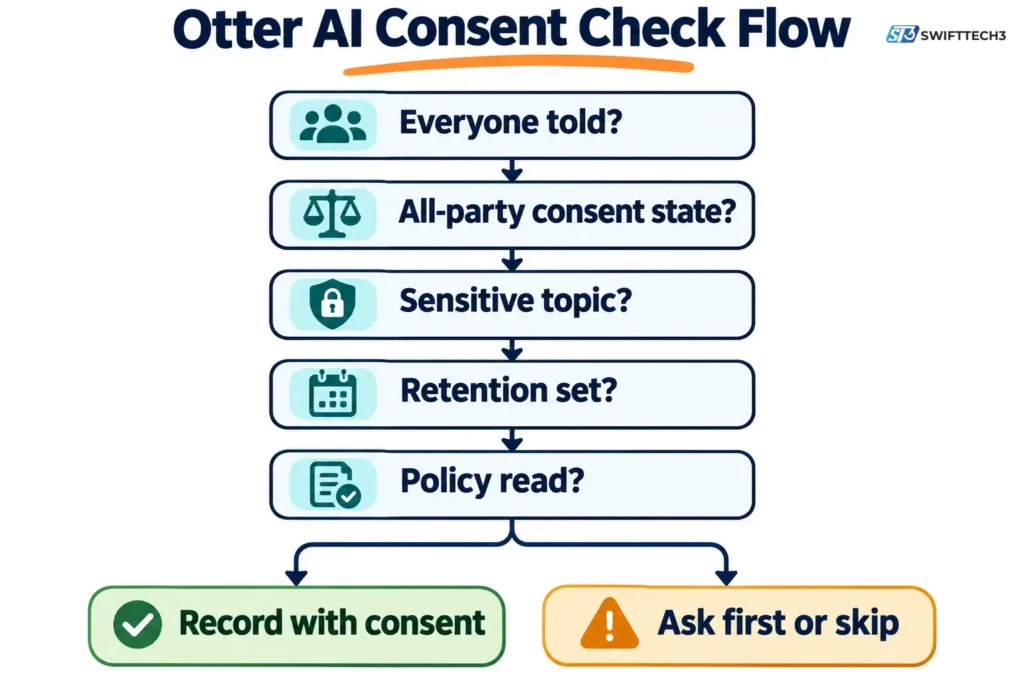
A five-question consent check before Otter joins a call
Otter’s terms place consent responsibility on the account holder, and its own help material says it asks the account holder to obtain the necessary permissions. California, for example, requires the consent of all parties to a conversation, while Virginia needs only one party, as Fast Company notes. Here is an original decision table built from those facts. The scoring is illustrative, not legal advice.
| Question | Safer answer | Raise the risk when |
|---|---|---|
| 1. Does everyone on the call know and agree it is being recorded? | Yes, said out loud at the start | Some attendees only see a bot name |
| 2. Is anyone in an all-party-consent state such as California or Illinois? | You have explicit consent from them | You do not know where attendees are |
| 3. Is the conversation medical, financial, legal or HR? | You use a plan and contract built for that data | You use a free or Pro account |
| 4. Do you need to keep the transcript? | You set retention and sharing on purpose | Auto-share is left on |
| 5. Have you read the current training-data policy? | Yes, and you accept it | You have not looked since signing up |
Rule of thumb: one “raise the risk” answer means ask first. Two or more means do not record with a bot, or choose a different tool.
How accurate is Otter AI?
Otter does not publish an independent accuracy figure that we could verify, so any percentage you see online is a third party’s claim or a vendor claim. What is on the record: Otter’s CMO told Fast Company that accuracy can drop with strong accents and colloquialisms. Apple’s editorial text on the App Store listing notes that better audio quality gives better results.
Language support is another place to check yourself. The App Store listing says English, Spanish, French and Japanese. Fast Company lists English, French, German, Spanish and simplified Chinese. Confirm the language you need on Otter’s current supported-languages page before paying.
If you also work with video and want searchable text from it, our video transcriber AI hub covers the wider category.
How do you set Otter up without surprises?
Start conservative, then loosen settings once you know who is being recorded. These steps follow Otter’s documented settings as reported by independent trackers in October 2026.
- Connect your calendar deliberately. Once connected, Notetaker can join any event that has a Zoom, Meet or Teams link.
- Pick a narrow auto-join option. Choices include every event with a link, only meetings you host, only external, only internal, or only meetings you select. “Only meetings you host” is the safest starting point.
- Turn off auto-share. Otter has a documented setting for this. Otherwise transcripts can reach more people than you intended.
- Enable pre-meeting notice emails. Reports say this is a setting, not a default. Enforcing it for everyone is an Enterprise-only control.
- Say it out loud. The bot’s name in the participant list is not the same as consent.
- Audit old connections. A university technology office warned in March 2026 that Otter may keep auto-joining meetings if you ever connected your calendar, even long after you stopped using it.
Who should use Otter AI, and who should skip it?
| Use Otter if you… | Skip or pause Otter if you… |
|---|---|
| Record a few short internal calls and can tell everyone first | Handle medical, legal or HR conversations on a Free, Pro or standard Business plan |
| Run meetings under 90 minutes, fewer than 1,200 minutes a month, in a team of 5 or fewer (Pro) | Need meetings longer than 90 minutes but are a solo user watching cost |
| Want notes that connect to tools such as your CRM through integrations | Meet with clients who object to a bot in the call |
| Want an app that also records in person | Need the data kept off a vendor cloud entirely |
If you need no cloud at all, consider offline options. Fast Company’s author recorded his interview with an offline transcription app, Google’s Recorder on Pixel phones. Our AI governance and compliance guide can help your team write a recording policy. If transcripts hold personal data, a redaction tool can reduce what you store.
Common mistakes with Otter
- Assuming the free plan covers hour-long meetings. You only see 30 minutes of each transcript.
- Paying monthly by default. On Pro that costs about twice as much as annual.
- Treating the visible bot as consent. The court case is exactly about that gap.
- Forgetting the team caps. Pro stops at 5 billed users and Business at 25.
- Letting a trial roll over. The Business trial charges every seat.
FAQs
Is Otter AI legit?
Yes, it is an established company with a widely used app. The App Store listing shows a 4.8 average from about 88,000 US ratings as of November 4, 2026. It is also a defendant in an unresolved privacy class action.
Is Otter AI free forever?
The Basic plan has no end date. It limits you to 300 minutes a month, 30 minutes of transcript per conversation and 3 lifetime imports.
Does Otter AI join meetings by itself?
It can. If you connect a calendar and choose an auto-join setting, Notetaker joins matching events as a visible participant. Change the setting if you want manual control.
Is Otter AI HIPAA compliant?
Only on Enterprise as an add-on, and only after a signed Business Associate Agreement, according to Otter’s published material as summarized by independent reviewers.
Has Otter AI been found guilty of anything?
No. A judge allowed key claims to continue on August 13, 2026, but no court has ruled on whether the allegations are true.
Can I get a refund?
Otter’s help center says no, as read by an independent tracker on October 7, 2026. Apple and Google apply their own policies to purchases made through their stores.
Is there a student discount?
Reports say Otter gives eligible students and teachers with a .edu address 20% off Pro, which works out to $79.99 a year. Check eligibility on Otter’s site.
Conclusion
Otter AI is a capable notetaker with a limited free plan, clear pricing and an unresolved consent lawsuit. Use Basic for short, low-stakes calls. Choose Pro annual if your meetings stay under 90 minutes. Move to Business only for bigger teams or longer calls. Before anything else, tell everyone you are recording.
Your next step: open your Otter calendar settings today and switch auto-join to “only meetings you host.”
Related: AI productivity tools updates for 2026
Disclaimer
This article is for informational purposes only and is not legal, financial or compliance advice. We are not affiliated with, sponsored by or endorsed by Otter.ai or any brand mentioned. Prices, features, limits and policies may change, and legal proceedings may develop after publication. Information last verified on November 4, 2026. Recording laws vary by location, and AI output can be inaccurate, so confirm consent requirements and review transcripts before relying on them.