Quick answer: Muse AI is Meta’s personal AI agent. It carries out multi-step tasks for you, such as booking travel, filling in forms and shopping, instead of only answering questions. It runs on Meta’s Muse Spark model, is free to start, and has paid plans at $20 and $100 a month. At launch it is available in the US only.
Introduction
Most people hear “Muse AI” and picture another chatbot. That is the wrong mental model, and it is why a lot of early advice about the product misses the point.
Muse is closer to a junior assistant who has been handed a laptop. Meta says it can open a browser, fill out forms, negotiate on your behalf, and keep working after you close the app. It also asks for something chatbots never did: access to your email, calendar, accounts and, potentially, your payments.
Soon after launch, Muse climbed to the top of the free-app charts. It also triggered a standoff with Amazon and a public argument over whether it read a journalist’s private messages. This guide covers how Muse works, what it costs, and what happened in the early weeks. It also covers the practical gaps most explainers skip, and how to set it up without handing over more than you intend.
What Is Muse AI?
Muse AI is a consumer AI agent from Meta, available in a dedicated app, on the muse.ai website, and inside WhatsApp. An agent works toward a goal across several steps and tools. A chatbot answers one prompt at a time.
Muse vs Muse Spark vs Meta AI
These three names get mixed up constantly:
- Muse is the agent, the product you use.
- Muse Spark is the underlying model family that powers it.
- Meta AI is Meta’s existing assistant inside its apps. Muse is a separate product.
One more warning for anyone searching: “Muse AI” is also a name used by unrelated tools, including a music-production app. This article covers Meta’s agent only.
How Muse AI Works
The Secure VM and the Sentinel
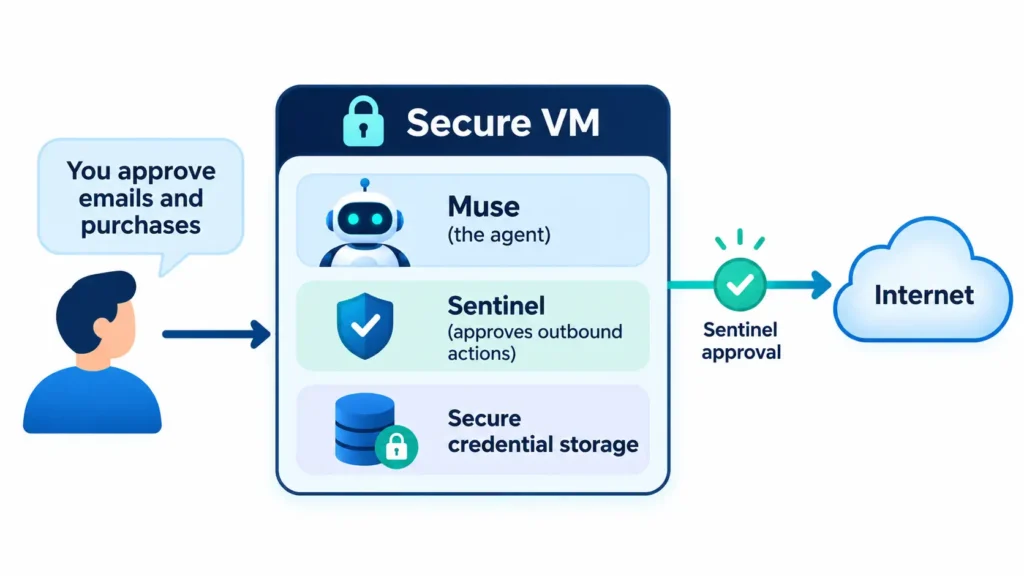
Muse runs on what Meta calls Muse Secure VM. That is a dedicated cloud computer holding both the agent and your data, isolated so no one else’s agent can reach it. A technology columnist who tested it reported that it is a Linux virtual machine with 8GB of memory and 8GB of storage.
A second agent, the Sentinel, runs on the same machine but is separated from Muse at the system level. According to Meta, nothing Muse does reaches the internet unless the Sentinel approves it, and the Sentinel asks you when needed.
Three more design choices matter in practice:
- Muse cannot see your passwords or payment methods. Credentials you share go into secure storage that Muse can use without viewing.
- It should check with you before sensitive actions like sending an email or buying something, and it keeps an audit trail of what it did.
- Meta says your conversations and VM data are not shared with its advertising systems.
A future feature, Muse Confidential VM, is planned. It would encrypt the whole VM with a key only you hold, so even Meta couldn’t access it. It hasn’t shipped, so don’t treat it as a current protection.
Connectors: where the usefulness comes from
Muse becomes useful through connectors. It launched with dozens of partners plus access to the full Shopify catalogue. Meta has since added big retailers such as Walmart, Best Buy, Sephora, Ulta and Wayfair, along with Shop Pay and PayPal for payments. Productivity tools like Notion, GitHub and Box are on the list, with Instacart for groceries and Expedia for travel on the way.
For checkout, Muse can use Link by Stripe, which generates one-time-use card details and includes purchase protections.
Glasses, voice and the Muse Charm
Meta says Muse is coming to its AI glasses. You will be able to say its name and have it act on what you’re looking at, such as a product on a shelf or a school-supply list. Meta has also announced a voice mode, a Muse email address, and a pocket device called Muse Charm, with more details promised later. If you follow wearables, our gadgets coverage tracks how these devices develop.
Muse AI Pricing and Free Limits
| Plan | Price | Weekly allowance |
|---|---|---|
| Free | $0 | Not published by Meta; testers report about 100M Muse tokens |
| Power | $20/month | 500M Muse tokens |
| Max (also called “Maximum”) | $100/month | 3B Muse tokens |
A payment card is required even to start on the free tier. The paid-plan figures are consistent across multiple reports and Meta’s subscription information. The free-tier number is the exception. It comes from third-party testing, not from Meta, so treat it as an estimate and rely on the in-app usage meter.
What Most Muse AI Coverage Misses
1. The real fight is about agent identity, not just security
Amazon blocked Muse from shopping on Amazon.com. Users now see a message saying an “unauthorized AI agent” violates its Conditions of Use. Amazon says Meta never told it Muse would access the store, that the agent doesn’t identify itself while browsing, and that it appears to capture customer credentials. Meta says Muse never sees passwords or payment details.
Two different claims are being compared here. One is Meta’s description of its own architecture. The other is Amazon’s view of the behavior from outside. Neither has been independently audited in public. Meanwhile, Shopify went the other way and let Muse in. For shoppers, this means Muse’s reach depends on merchant politics, not just on its technology.
There is legal context too. Amazon recently lost a court ruling in its fight with another company’s shopping agent, and it now leans more on its contractual terms to keep unapproved agents out.
2. The trust gap is in permission design, not the VM
An Inc. columnist reported that Muse’s Mac app synced his local Messages database even though he says he had declined to give it access. Meta publicly disputes this. Its position is that Muse can’t read Messages on a Mac unless the user turns on two separate settings: Full Disk Access (a macOS permission) and the Messages connector inside the Muse app. A Meta executive added that reading Messages takes three layers of permissions, and that macOS protections can’t be bypassed even if the app had a bug.
Both sides agree on one thing: when the columnist asked Muse how it knew about his messages, it gave an incorrect explanation, saying it only saw notification banners. Meta’s own executive described that as the agent being confused about how to explain the feature.
No independent audit has settled the underlying dispute. The practical lesson doesn’t depend on who is right. An agent’s description of its own access is not a reliable record, so check your settings and logs yourself. Meta also notes that removing Full Disk Access stops new messages from passing to Muse, which says nothing about data already synced. If you have granted access and want to undo it, revoke the permission and also tell Muse to forget what it has learned.
3. Not all tasks cost the same
Third-party testers report that using a clean connector, like a calendar integration, uses far fewer tokens than having Muse click around a website. That is community testing, not Meta guidance, but it matches how agents work. Browser-driven tasks take many steps. On the free tier, prefer connectors when you have the choice.
4. Availability is narrower than the hype
Meta says Muse is rolling out in the US. If you’re in the UK or elsewhere, check the app store listing and Meta’s official pages before planning around it.
Benefits of Muse AI
- Hands-off follow-through. It keeps working after you close the app and returns when it needs approval.
- Memory. Meta says it remembers details you mention once, such as a friend’s dietary restrictions, and lets you tell it to forget things.
- Low barrier. It works through chat or WhatsApp, with no technical setup.
- Payment protections. Link’s one-time cards keep your real card details hidden.
- Cost. Most people can start free.
Common Mistakes to Avoid
- Connecting everything on day one. Add connectors one at a time as you need them.
- Treating “free” as unlimited. There’s a weekly meter, and heavy browsing uses it faster.
- Granting system-level access casually. On a Mac, Full Disk Access is broad. Only grant it if you need it, and set the Messages connector to None unless you want Muse reading your texts.
- Trusting the agent’s own explanation of its access. Verify in settings and the activity log.
- Skipping the activity log. Meta says it keeps an audit trail, so read it.
- Ignoring the training setting. Meta says you can opt out of your interactions being used to train its models. Some reporting indicates eligible data is used by default, so check Settings.
- Assuming every store works. Some retailers, Amazon among them, block Muse.
Best Practices: A 10-Minute Muse Safety Setup
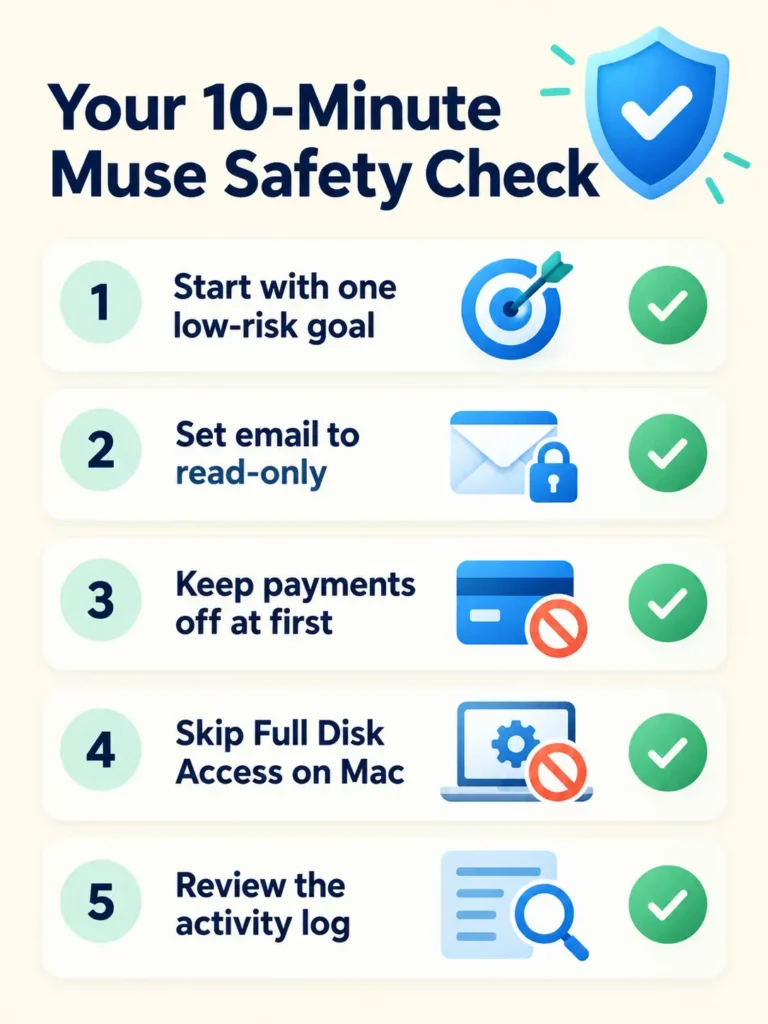
- Start with one low-risk goal, such as a meal plan or a reminder routine, before connecting email.
- Set email to read-only at first. Allow sending later if you trust the results.
- Leave payments off until you’ve watched it handle a free task.
- Skip Full Disk Access on Mac unless you have a clear reason for it.
- Open the training opt-out setting and decide deliberately.
- Review the audit trail after your first session.
- Recheck system permissions a day later.
- Watch the usage meter for a week before deciding on a paid plan.
If you’re curious how people use AI to practise real-world skills, see our guide to AI coaching tools. You’ll find more tool breakdowns in our Artificial Intelligence and Software sections.
Personal Experience: What the Research Process Taught Us
A transparency note first. Muse is limited to the US at launch and needs a payment card to sign up, so we have not run it on our own accounts. We would rather say that than invent a first-hand review. What follows is what we observed while verifying this article, plus what people who have used it have reported.
What we observed while checking facts:
- The top plan is called “Maximum” in some coverage and “Max” in others. Small naming drift like this is common in fast-moving launches.
- Meta’s help pages load dynamically, which made them hard to read directly. We cross-checked paid-plan figures across several independent outlets, and they agreed.
- The free-tier allowance appears nowhere in Meta’s own materials that we could read. Every number we found came from testers.
- Outlets sometimes disagreed on small details, such as the exact day of events. That is a good reason to favor primary statements over summaries.
Lessons from hands-on reports:
- A published hands-on account and Meta’s rebuttal disagree on how a setting got enabled, yet both agree that the agent explained its own access wrongly. Never rely on the agent to audit itself.
- The most successful early use cases in Meta’s own materials are errands and planning, which are low-stakes and easy to verify.
Lesson learned: verify the claim, then verify it again after the product updates. With agents, last month’s behavior is not a guarantee.
Muse AI FAQs
What is Muse AI?
Muse AI is Meta’s personal AI agent. It performs tasks across apps and websites for you, instead of only answering questions.
Is Muse AI free?
Yes, to start. The free tier has a weekly usage allowance, and you need a payment card to sign up. Power costs $20 a month and Max (also called Maximum) costs $100 a month.
What AI model powers Muse?
Muse runs on Muse Spark, Meta’s own model family. The agent is the product, and the model is the engine.
Is Muse AI available in the UK?
At launch, Meta says Muse is rolling out in the US. Check Meta’s official site or your app store for current availability.
Is Muse AI safe?
Meta says Muse runs in an isolated VM, can’t see your passwords or payment methods, and asks before sensitive actions. Independent security experts haven’t fully verified these claims, and there has been a public dispute about Mac message access. Start with limited permissions.
Can Muse AI read my messages?
On a Mac, Meta says it can only do so if you enable both Full Disk Access and the Messages connector. Leave either off and, per Meta, it can’t read your Messages. Review both settings yourself.
Can Muse AI shop on Amazon?
Not at present. Amazon blocked it, though Shopify stores and several other retailers are supported. This could change, so check before relying on it.
Does Muse AI use my data to train models?
Meta says you can opt out of your interactions being used for training. Some reporting indicates it’s on by default, so check Settings.
How is Muse different from ChatGPT or Gemini?
Muse is built around taking actions with its own browser and connected apps, and it works in the background. Other products now offer agents too, so compare features and permissions rather than names.
Conclusion
Muse AI is the most visible attempt yet to put a real agent in everyone’s pocket for free. The convenience is real: errands, follow-through and memory without technical setup. But it shifts the question from “Is the answer correct?” to “Did the agent do the right thing with my accounts?” Early disputes with Amazon and over Mac message access show that question is still open.
Actionable takeaways:
- Treat Muse as a capable assistant on probation. Start small.
- Connect one service at a time and keep payments off until you’ve seen it work.
- On a Mac, skip Full Disk Access unless you need it.
- Review the activity log and your system permissions after the first day.
- Judge the free tier by your meter, not by rumours.
- Recheck pricing and availability before you commit, because they change fast.
Disclaimer: This article is for general information only. Product features, prices and availability change quickly. Privacy and security descriptions come from Meta’s own statements and press coverage and have not been independently audited here. Nothing in this article is financial, legal or security advice. Review Meta’s current terms and privacy settings before connecting personal accounts.