You search “gdtj45 builder software” and get a dozen confident guides with install steps, system requirements and user statistics. Then you look for the company, the download page or the documentation, and none of them point to one.
That gap is the story. As of October 29, 2026, we found no verifiable evidence of a software product called GDTJ45 Builder: no named developer, no public repository, no package on the major registries, and no vendor documentation. This article shows what we checked, why the guides disagree with each other, what to do if you already downloaded something, and which real tools do the jobs the guides describe.
At a glance
| Question | Answer as of October 2026 |
|---|---|
| Is there a verified GDTJ45 Builder product? | No evidence found |
| Is there a named developer or vendor? | None named in the three guides we read in full |
| Should you download an installer with this name? | No |
| Could it be a private or internal project name? | Possible, but unproven |
| What should you do instead? | Pick a documented tool for the job you actually need |
Is GDTJ45 Builder software real?
We could not confirm that it is. In our check on October 29, 2026, we searched the places where real developer software normally leaves a trace.
| Where we looked | What we searched | Result |
|---|---|---|
| GitHub repositories | “gdtj45” and the phrase “gdtj45 builder” | 0 repositories for each |
| GitHub users and issues | “gdtj45” | 0 accounts, 0 issues |
| npm registry | Packages “gdtj45” and “gdtj45-builder”; keyword search | Both packages not found; 0 search results |
| PyPI | Packages “gdtj45” and “gdtj45-builder” | Both not found |
| crates.io (Rust) | Package “gdtj45” | Not found |
| Three guides read in full | Developer name, documentation, release notes | None named or linked |
GitHub’s code search needed a login, so we could not run it. We also could not open the website gdtj45.com from our environment. We therefore have no first-hand view of what it contains.
What most people miss: an empty result on GitHub or npm does not prove a product is fake. Closed-source commercial software would not appear there. What makes the case is the combination. There is no code trail, no vendor, no documentation and no release history, and the guides contradict each other.
Why do so many guides describe it?
Because a made-up or obscure name has almost no competition in search, and the features the guides describe are real features of other products. Visual builders, code editors and collaboration tools all exist. Attaching them to an unfamiliar name makes a believable page.
The guides cannot agree on what the thing is:
| What a guide says | Where it clashes |
|---|---|
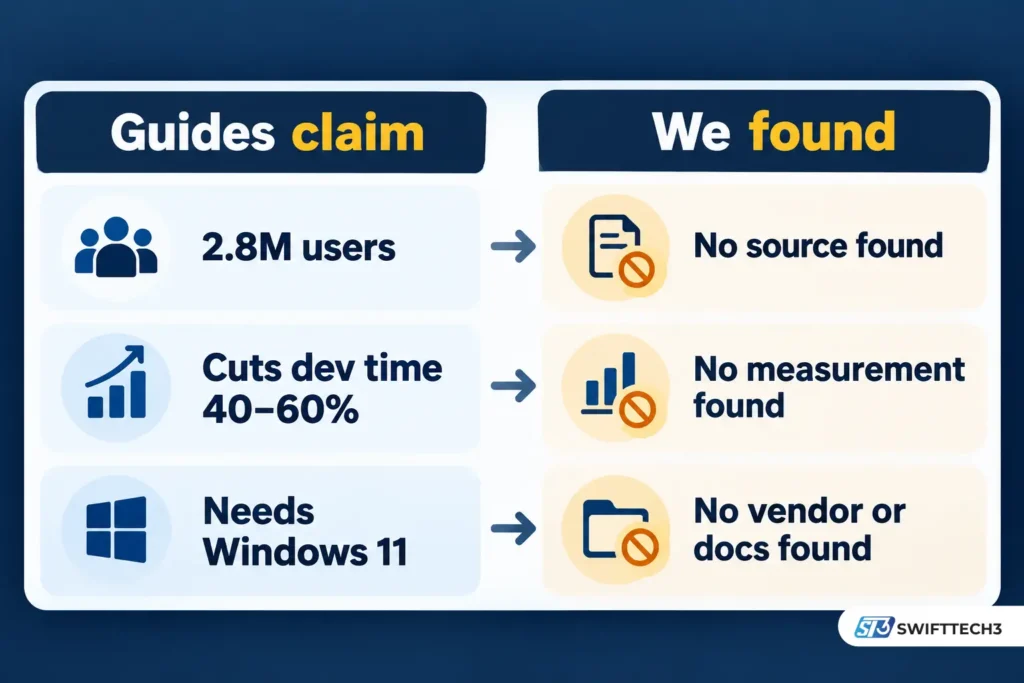
| A guide published January 2026 says it “emerged in 2026” and runs in a web browser | Other pages cite 2.8 million active users in 2024, and describe a desktop-style install needing Windows 11 and 8GB of RAM |
| Some pages call it a modular developer platform | Others describe it as a tool for construction teams |
| A guide published October 2026 describes it as a “builder-oriented software concept” | It admits the name alone does not establish a product category, platform, licence or feature set |
Two of these conflicts are impossible to reconcile. A product that appeared in 2026 cannot have posted user growth for 2024. A browser-based service does not need a local installer and a RAM minimum.
The October 2026 guide deserves credit for being honest about what it does not know. Most of the others skip that step.
If you want to see how this pattern works on another invented name, our breakdown of how fabricated SEO guides are built walks through one from the inside.
Is it safe to download GDTJ45 Builder?
No. You cannot verify who made the file, so you cannot know what it does. An executable can carry any name, including a technical-sounding one.
One more detail matters here. Two of the guides we read tell you to switch off your antivirus or firewall during installation. A security tool that blocks an installer is doing its job, and turning it off for software with no known publisher removes your only check. Do not follow that advice.
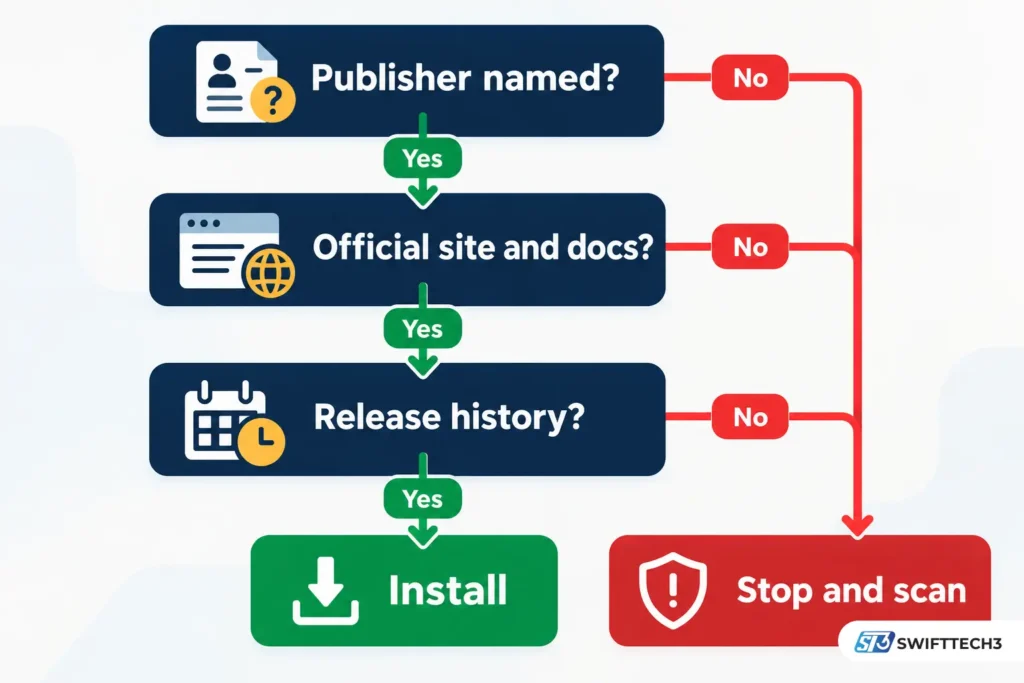
Before running any unfamiliar installer, ask whether you can name the publisher, find its official site, read its documentation and see a release history. If the answer to any of these is no, skip it. Our secure software download guide covers general habits for sourcing installers safely.
What if you already downloaded or installed it?
Don’t panic, but stop using it. The file may be harmless, or it may not. You cannot tell from the name.
- Don’t open the file if you haven’t yet.
- Run a full scan with your up-to-date security software.
- Check your installed programs and startup items for anything you don’t recognise.
- Change passwords for any account you typed into the program or into the site that offered it, using a different device if you can.
- Tell your IT team if the computer belongs to your employer. Don’t investigate it yourself.
Software GDTJ45 Builder does not work: what’s going on?
Usually you are troubleshooting something that was never a documented product. Standard fixes such as reinstalling or updating assume there is a real program with a real update channel behind the file.
| Situation | Likely cause | What to do |
|---|---|---|
| You ran an installer from a download page and nothing launches | The file isn’t what its name claims | Stop, scan, remove it |
| You followed a guide’s steps and the menus it describes don’t exist | The guide describes features that were never verified | Use a documented tool instead |
| Your employer or school gave you a file or project labelled GDTJ45 | Possibly an internal project name | Ask the person who supplied it which tool opens it |
| “gdtj45” appears in an error log or filename in your own project | An identifier from a project or vendor you haven’t traced yet | Search your project files for the tool that generated it |
None of these fixes is a “tweak a setting” fix. The first step is working out where the file came from.
Can you edit code in GDTJ45 Builder?
Not in any verified product. Guides that walk you through “editing code” in it describe menus and buttons that no official documentation backs up. If you need to edit code, use an established editor or IDE that has public documentation, a named publisher and a release history. If a colleague gave you a specific project file, ask them which tool created it, and open it with that tool.
Could GDTJ45 be an internal or private tool?
Yes, technically. Any company, contractor or developer can give a private project any name, and an alphanumeric string like this looks more like a project label than a consumer brand.
That is a different claim from the public product the guides describe. If someone at your organisation says GDTJ45 is theirs, get the installer and instructions from them, not from a website that happens to use the name.
A five-proof test for any unfamiliar builder software
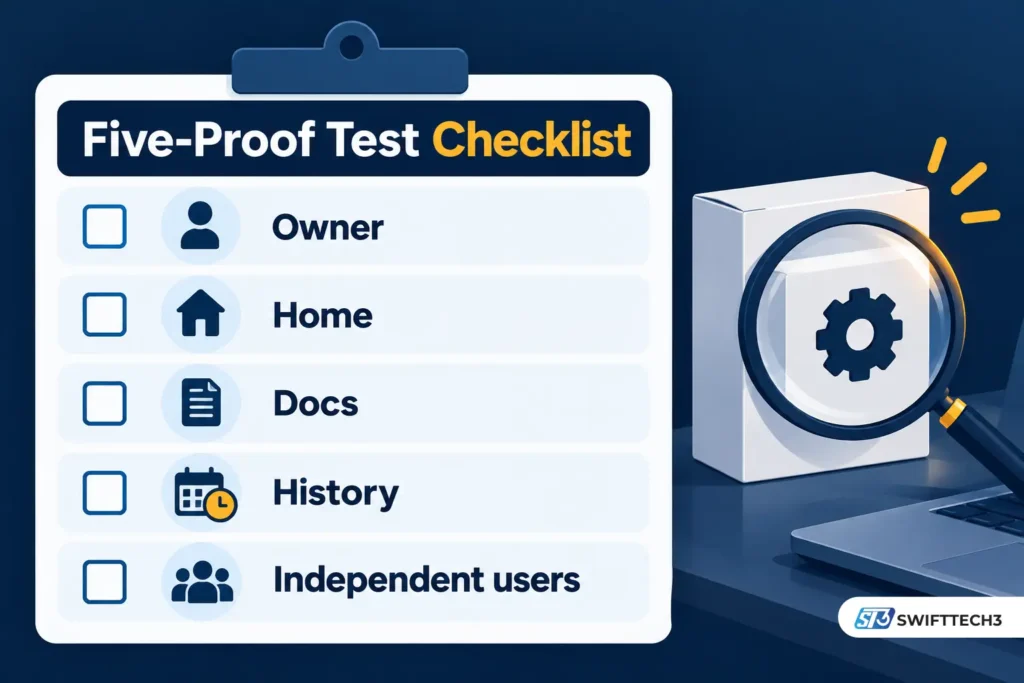
This is a quick checklist for evaluating unfamiliar software. Each item is a yes or no, and any “no” is a reason to pause. Here is how GDTJ45 Builder fares:
| Proof | The question | GDTJ45 Builder, as of October 29, 2026 |
|---|---|---|
| Owner | Is there a named company or developer? | None found |
| Home | Is there code or a package on a public registry? | None found on GitHub, npm, PyPI or crates.io |
| Docs | Are there official docs or release notes? | None found |
| History | Is there a version history over time? | None found |
| Independent users | Do people outside the content cluster discuss real workflows? | Only repeated articles, which contradict each other |
This is not a score. A real product can fail one item, such as an unpublished code repository. Failing all five, with contradictory descriptions on top, is a different matter.
Myth vs fact
| Claim in circulating guides | What we can say |
|---|---|
| “2.8 million active users” | No source or vendor behind the number was found; the date conflicts with a 2026 launch claim |
| “Cuts development time by 40–60%” | No measurement, study or named customer was found |
| “Needs 8GB RAM and Windows 11” | Requirements require a real installer and vendor; none could be verified |
| “Disable your antivirus to install” | Poor advice for any software, and worse for software of unknown origin |
What to use instead
Pick by the job, not by the name. The tools below have identifiable organisations and public documentation, and we confirmed they exist. Check each vendor’s own page for current plans and prices.
| Your goal | Established options |
|---|---|
| Internal dashboards, admin panels, forms | Appsmith (open source, Apache 2.0 licence, can be self-hosted), Retool, Microsoft Power Apps |
| Open-source alternatives for internal tools | Budibase, ToolJet |
| Choosing a framework for a web app | See our guide on why web applications stop scaling |
| Automating engineering workflows | See our AI engineering workflow automation guide |
For a business, the extra questions are who owns the product, how you export your data, what happens if the vendor shuts down, and how security updates are delivered. An unverifiable tool cannot answer any of them.
FAQs
Is GDTJ45 Builder free?
There is no verified pricing, so there is no basis for calling it free or paid. Be wary of any page that quotes a price or a cost saving without naming a vendor.
Is GDTJ45 Builder a virus?
We have no evidence that every file with this name is malicious, and no evidence that any is safe. Because the publisher is unknown, treat any such installer as untrusted.
Does it work on Windows, Mac or Linux?
Guides claim platform support, but with no vendor or documentation these claims cannot be confirmed.
Which programming languages does it support?
Some guides list JavaScript, Python and Java. These lists look like generic descriptions of builder platforms, and no official documentation supports them.
Why does it rank in Google if it isn’t real?
Search engines index whatever is published. Many near-identical pages can make a name look established, but repetition is not evidence.
Could my company be using it internally?
Possibly. Ask the person or team who supplied it, and get the software from them rather than from the web.
What should I search for instead?
Search for the job: “low-code internal tool builder”, “code editor” or “website builder”. Then compare documented products.
Conclusion
GDTJ45 Builder software is, as of October 2026, an unverified name with a lot of unverified content around it. We found no developer, no code, no packages and no documentation, and the guides contradict each other on basic facts.
Key takeaways: don’t download installers with this name, don’t disable your antivirus for them, and treat statistics without a named source as noise. If you need a builder, choose one by the job it does and check the five proofs first.
Next step: if you already ran a GDTJ45 file, scan your device today and tell your IT team if it’s a work machine.
Related: AI online fraud prevention
Disclaimer: This article is for informational purposes only and is not affiliated with, sponsored by or endorsed by any brand mentioned. Prices, features and policies may change. Information last verified on October 29, 2026. Do not run software from unverified sources, and note that AI-assisted content can contain errors, so check important details yourself.