Kling AI is an AI video and image generator made by Beijing-based Kuaishou. You describe a scene in text, or upload images, video clips and voice samples, and it returns a short video with sound. Kling 4.0, the current model, opened to the public in mid-October 2026 and generates 3 to 30 seconds per clip. Free accounts add a Kling watermark and cannot be used commercially. Paid plans start at $6.99 for the first month ($8.80 after that) and remove both limits. This guide covers what changed, what a clip really costs, and what the terms say.
What Kling AI is and who makes it
Kling AI is a generative AI service created and hosted by Kuaishou, a Chinese technology company that runs a large short-video platform. According to Wikipedia, Kuaishou launched the first version in June 2024 as a public test inside its KuaiYing editing app. The same entry says Kling uses a diffusion transformer architecture with a self-developed 3D variational autoencoder, which compresses video across space and time together.
The product has moved quickly since then. Kling 1.6 arrived in December 2024, followed by 2.0 in April 2025 and 2.1 in May 2025. Kling 3.0 came in February 2026, and Kling 4.0 in October 2026. The service you use as a customer is contracted through Kling AI Pte. Ltd., a Singapore entity named in the terms of service.
Kling’s launch release says the platform has served more than 100 million users and more than 50,000 enterprise customers. That is the company’s own figure, so treat it as a claim rather than an audit.
Kling 4.0: what changed
Kling’s 4.0 user guide (dated October 14, 2026) and its launch release describe four main upgrades: steadier motion, longer single clips, more reference inputs, and better audio and text.
| Capability | Kling 4.0, per Kling’s user guide |
|---|---|
| Clip length | 3 to 30 seconds per generation, default 10 |
| Resolution | 720p, 1080p and 4K listed |
| Aspect ratios | 21:9, 16:9, 1:1, 9:16, Auto |
| Audio | Two-channel stereo, improved lip sync |
| Languages | Chinese, English, Japanese, Korean, Spanish, Portuguese, German, French, Hindi, plus accents |
| Keyframes | Up to 10 images placed along the timeline |
| References | Up to 15 in total: 10 images, 5 videos (30 seconds combined), 7 elements, 3 voice profiles |
| Prompt length | Up to 8,000 tokens |
| Text in video | Multilingual text, emoji and logos |
Two things are still marked “coming soon” in Kling’s own guide: 10-bit HDR output, and extending a video up to two minutes. The launch release also says enterprise and developer API access will follow soon. It adds that Adobe plans to bring Kling 4.0 and 4.0 Flash to Adobe Firefly. Kling’s guide says parameters are subject to the actual product interface, so check the resolution and duration menus in your own account before you plan a delivery.
Full model versus Flash
Kling 4.0 Flash is the faster, cheaper-to-run sibling. Independent coverage of Kling’s feature page puts Flash at up to 20 seconds, 720p and standard dynamic range, without first-and-last-frame or multi-keyframe support. Kling says Flash is built for high-volume work. It has not published a credit price for either model that I could verify, so don’t assume Flash is cheaper per second until your account shows the quote.
Older models still matter
Kling 3.0 supports 3 to 15 second clips with native audio, multi-shot scenes and native 4K, according to independent summaries of Kling’s own guide. It also has published credit rates, which 4.0 does not yet. For budget-sensitive work, 3.0 is a known quantity.
Kling AI pricing and credits
Kling sells monthly or yearly memberships that include a monthly pile of credits. Every generation spends credits. These plan prices come from Kling’s membership page as read by independent reviewers on October 13 to 15, 2026. Kling’s own pricing page loads dynamically, so I could not read it directly.
| Plan | First month | Monthly after | Credits per month |
|---|---|---|---|
| Basic | Free | Free | No monthly plan credits |
| Standard | $6.99 | $8.80 | 660 |
| Pro | $25.99 | $32.56 | 3,000 |
| Premier (8K selection) | $64.99 | $80.96 | 8,000 |
Higher tiers exist, and Kling’s paid-service terms (dated October 10, 2026) list several Premier sub-grades and an “Ultra+” membership. The top of the range was being reshuffled around the 4.0 launch, so I am not quoting those prices. Check the live membership page.
The credit rules come straight from Kling’s Credits Policy:
- Purchased credits cost $1 for 66 credits at the standard rate and last two years.
- Monthly subscription credits last one month from the day they arrive.
- Credits with the shortest remaining life are spent first.
- If a generation fails, the credits are refunded.
- Credits do not buy everything. Fast-track generation, 1080p, watermark removal, video extension and image upscaling are premium-only features.
That last point is the one most people miss. Topping up credits on a free account does not remove the watermark or unlock 1080p. You need a membership for those.
What a clip costs in practice
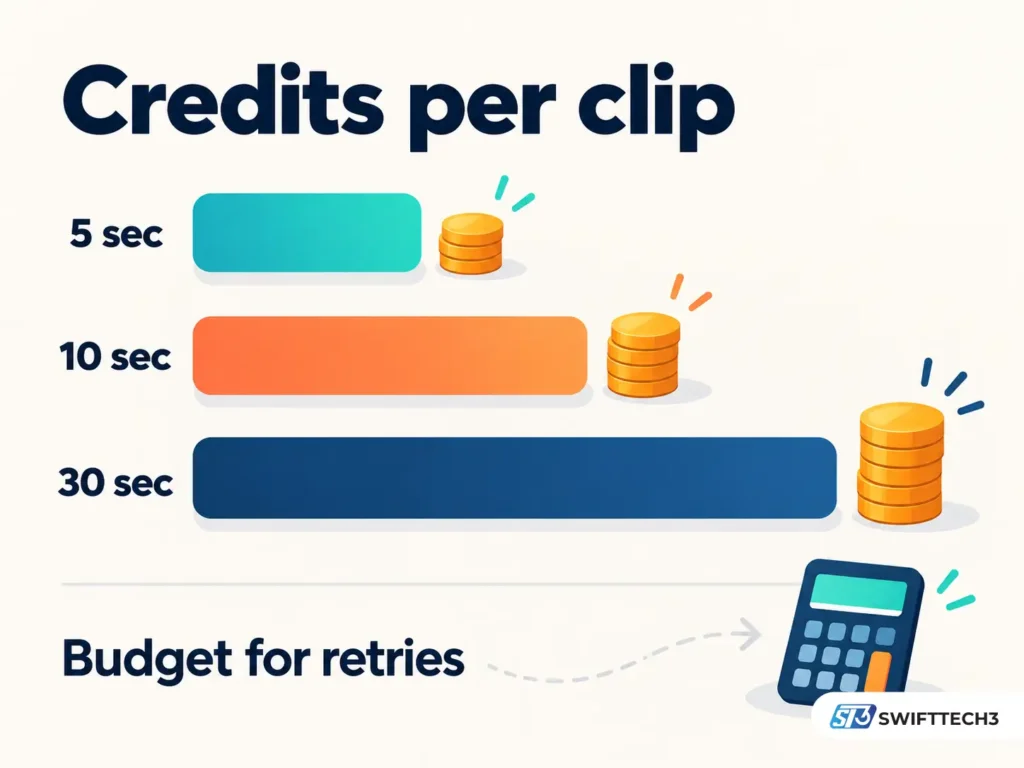
Kling has not published a per-second credit rate for 4.0 in sources I could verify. Kling 3.0 is published: roughly 6 to 12 credits per second at 720p or 1080p, depending on whether native audio is on, and 30 credits per second for native 4K.
Use that as a yardstick. A 10-second 1080p clip with audio on 3.0 costs about 120 credits. At the purchased-credit rate of $1 per 66 credits, that is about $1.82 per attempt. Five attempts to get one keeper is about $9. On a Standard plan, 660 credits covers roughly 55 seconds of 1080p video with audio, retries included. Always read the credit quote in the generation panel before you press the button.
Free plan, watermarks and commercial use
The free Basic plan is for trying things out. Kling’s paid-service terms say members hold the right to remove brand watermarks. Non-members must label generated content with the Kling brand, or state prominently that Kling AI generated it if the mark is missing.
Commercial use is where the paperwork matters. The main terms of service restrict commercial use of output without written permission. The paid-service terms, which state that they prevail over the main terms if the two conflict, say members’ commercial use of output is not restricted. The exception is using it to build competing products or services. In short: free output is not for commercial use, and a paid membership is how you get that permission.
How to make your first Kling 4.0 video
This workflow follows Kling’s user guide.
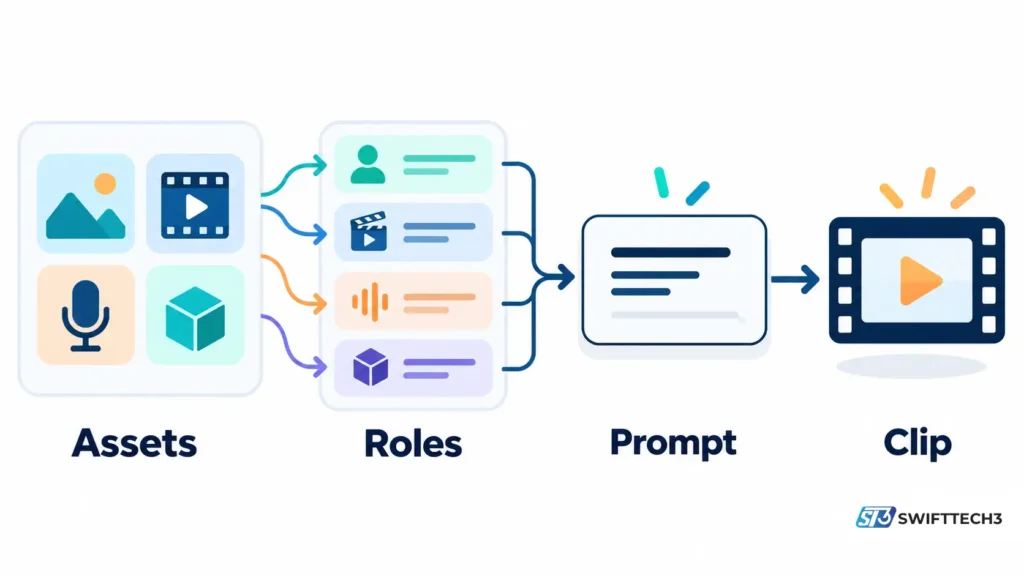
- Pick one entry point. Omni Reference accepts images, videos and voice profiles, and also handles plain text-to-video. Keyframes accepts only images and lets you pin moments on the timeline. Kling says the two cannot be combined in one task.
- Prepare your assets. Images must be under 30 MB with an aspect ratio between 2:5 and 5:2. Videos run 3 to 30 seconds, under 300 MB each. Reference videos, editing videos and video elements share one pool of five clips and 30 combined seconds.
- Give each asset a role. Assets are numbered in upload order (@Image1, @Video1). Write what each one is for, such as “@Image1 defines the character’s face and outfit.” Without roles, the model guesses.
- Structure the prompt. The guide suggests four blocks: asset roles, overall settings (scene, style, camera tone), a timed sequence of events, and audio.
- Describe, don’t judge. Kling recommends concrete visuals over abstract words. “Premium look” is weak. “Side backlight outlines the edges, background blurred, fine matte grain on the surface” is strong.
- Skip most negative instructions. Kling says negatives can raise the chance of errors. It names only two worth using: no subtitles and no background music.
- Edit with the right verb. To change an existing clip, start with “Edit @Video1” and add “Keep everything else unchanged.” Writing “Reference @Video1” can trigger new generation instead.
- Draft short, finish long. Test the idea at a shorter length and lower resolution, then regenerate the keeper at final settings.
Prompting tips that follow from the guide
- Put dialogue in quotation marks in the language you want spoken, and describe the voice (age, pace, emotion).
- Specify subtitle font size, position and timing if you want burned-in captions. For captions made outside Kling, this roundup of caption generators for Reels and TikTok covers alternatives.
- State which elements must stay fixed, and which should change, before you ask for a restyle.
- For animation styles, explicitly exclude photorealism so the model doesn’t blend the two.
- If you need clean reference images before generating video, an image tool like the ones in this Nano Banana AI toolkit guide can produce them.
What you agree to when you upload
Kling’s terms of service (last updated April 21, 2026) contain points worth reading before you upload anything.
- Ownership. You own the rights in your content under applicable law, and Kling says it does not claim ownership.
- Kling’s license. You also grant Kling a non-exclusive, royalty-free license to use your input and output. The terms list model training and development among the permitted uses. You can ask Kling to stop using your content by emailing support@kling.ai.
- Confidentiality. Content you upload or publish is treated as non-proprietary and non-confidential. Don’t upload anything confidential.
- Sharing features. Published content may be reused by other users through features like “Recreate.”
- Rights to inputs. You must hold the rights to anything you upload, and the paid terms require consent from identifiable people in your inputs.
- Output limits. You can’t use output to train your own AI models, or use output about a person for decisions on credit, employment, housing, insurance or similar matters.
- Teams. Assets created in a Team Space belong to the Team Owner. Agencies and freelancers should settle that before a project starts.
- Disputes. Singapore law governs the terms. Disputes go to individual arbitration, not class actions.
For companies setting rules on staff use of tools like this, AI governance and compliance is a useful starting point.
Copyright in the United States
Kling says you own your content “under applicable law,” and that phrase carries weight. In its January 2025 report on copyrightability, the U.S. Copyright Office concluded that prompts alone do not give a person enough control to be the author of AI output. It said copyright does not extend to purely AI-generated material. It also said human authors keep protection for their own expression that appears in an output, and for creative selection, arrangement or modification of AI material. Each case is judged individually.
In practice: a clip made from one prompt is unlikely to be protectable as is. A clip you storyboard, edit, and combine with your own footage or artwork has a stronger case. Brand owners who need to enforce rights should talk to an IP lawyer.
Staying safe: fake Kling sites
Kling’s international site is kling.ai, and its China site is klingai.com, per Wikipedia. Scammers have used the brand before. Wikipedia, citing coverage in The Hacker News and PCMag, notes a May 2025 campaign that used fake Kling AI sites and ads to spread infostealer malware. Independent reviewers have also warned that sites with “Kling 4” in the name sell their own credit packs. Type the address yourself, don’t download “Kling 4 installers,” and pay only through the official checkout. More on spotting these scams in this guide to AI online fraud prevention.
Common mistakes
- Assuming a free-account clip can go into an ad.
- Buying a monthly plan for a one-off project and letting the credits expire after a month.
- Treating the first-month price as the recurring price.
- Mixing Omni Reference and Keyframes in one task.
- Uploading reference assets without saying what each is for.
- Piling negative instructions into the prompt.
- Uploading client-confidential material or other people’s faces without permission.
- Cancelling at the last minute. Kling’s rules note that cancelling within a day of renewal may already have triggered the next charge.
Practical Insights
These points come from Kling’s published rules and simple arithmetic, not from hands-on testing.
Budget per second, then multiply by attempts. Longer clips don’t just cost more. They give the model more time to drift, so you may need more tries. On 3.0’s published rates, a 30-second 1080p clip with audio would be 360 credits per attempt. Since 4.0 rates aren’t public, use the quote screen as your source of truth.
A membership and a top-up do different jobs. Memberships unlock 1080p, watermark removal and commercial rights. Top-ups only add credits, but they last two years. A light user who needs a few clean clips may want one month of Standard, plus careful credit use. A steady producer gets better value from a larger plan.
Auto-renewal is easy to forget. Kling’s terms say fees are non-refundable once a paid service is activated, and subscriptions renew until you cancel. Cancel on the same day you subscribe if you only want one month. Members can also switch on credit auto-recharge, so check those thresholds.
Reference discipline beats prompt length. The guide’s biggest controls are asset roles, timed beats and a short list of must-keep details. A tight prompt with clear roles gives the model less to guess about than a long, vague one.
Finish outside the tool when it helps. Kling 4.0 puts 10-bit HDR and long extension on its roadmap. Until they land in your account, plan any upscaling, captions or color work in separate tools, such as the one covered in this AI video enhancer review.
Test the format you actually sell. If you make creator-style ads, compare Kling output against a dedicated AI UGC video tool using the same brief before you commit to a yearly plan.
FAQs
What is Kling AI?
It is a text-, image- and video-to-video generator from Kuaishou. You can start with a prompt or add references, and the output includes synchronized sound.
Who owns Kling AI?
Kuaishou, a Beijing-based company, created and hosts it. Customer contracts are with Kling AI Pte. Ltd. in Singapore.
Is Kling 4.0 available in the US?
Kling calls the October 2026 release a global launch and says it is available on its website. What your own account can use depends on its plan and settings, so check the model menu after you log in.
Is Kling AI free?
There is a free Basic plan, but it has no monthly plan credits, no commercial use, and a Kling watermark. Kling’s FAQ says non-subscribers can claim some free credits, but the public pages don’t state the amount.
How long can a Kling 4.0 video be?
Each generation runs 3 to 30 seconds. Kling lists extension to two minutes as coming soon.
Can I use Kling videos commercially?
Kling’s paid-service terms say members’ commercial use of output is not restricted, apart from building competing products. Free-account output is not licensed for commercial use.
Does Kling have an API?
Yes. Kling runs a developer platform with prepaid packages. The 4.0 launch release says API access for developers and enterprises is coming soon, so check its current model list.
Can I copyright a Kling video?
Possibly in part. The U.S. Copyright Office says purely AI-generated material isn’t protected, but your own creative contributions and arrangement can be.
Conclusion
Kling 4.0 is a meaningful step for anyone making short videos with sound, longer takes and consistent characters. The clearest wins are the 30-second clip length, the larger reference system and multilingual dialogue. The things to confirm in your own account are the credit quote, the resolution options, and whether the roadmap features have arrived.
Actionable takeaways:
- Use kling.ai directly and pay only through its official checkout.
- Choose a paid plan if you need clean, commercial-use output. Treat the first-month price as a promotion.
- Check the credit quote before every generation and budget for several attempts.
- Pick Omni Reference or Keyframes up front, and label every asset with a role.
- Read the license and privacy terms before uploading client or personal material.
- Add real human creative work if you need to protect the result as your own.
Disclaimer
This article is general information about a software product and is not legal or financial advice. Prices, plans, features and availability for Kling AI change often and can differ by account, so confirm details on Kling’s official pages before you subscribe, upload or publish. Copyright and contract rules vary by country, so consult a qualified lawyer for commercial or legal questions. Information current as of October 2026.